ArredoCAD Designer 2025 - Maintenance Subscription
Overview
ArredoCAD Designer has been specially designed for creating interiors and with this 3D interior design software, you can reproduce the models of any manufacturer or create any design or architectural solution according to the different needs of your customers, making possible to draw and furnish a single room as well as an entire flat. The huge libraries containing furniture, doors, materials and finishes, configurable according to the needs of the user, are constantly updated and can be enriched through 3D objects imported from 3ds Max or Sketchup. |
|
3D presentations that can be navigated and shared remotely
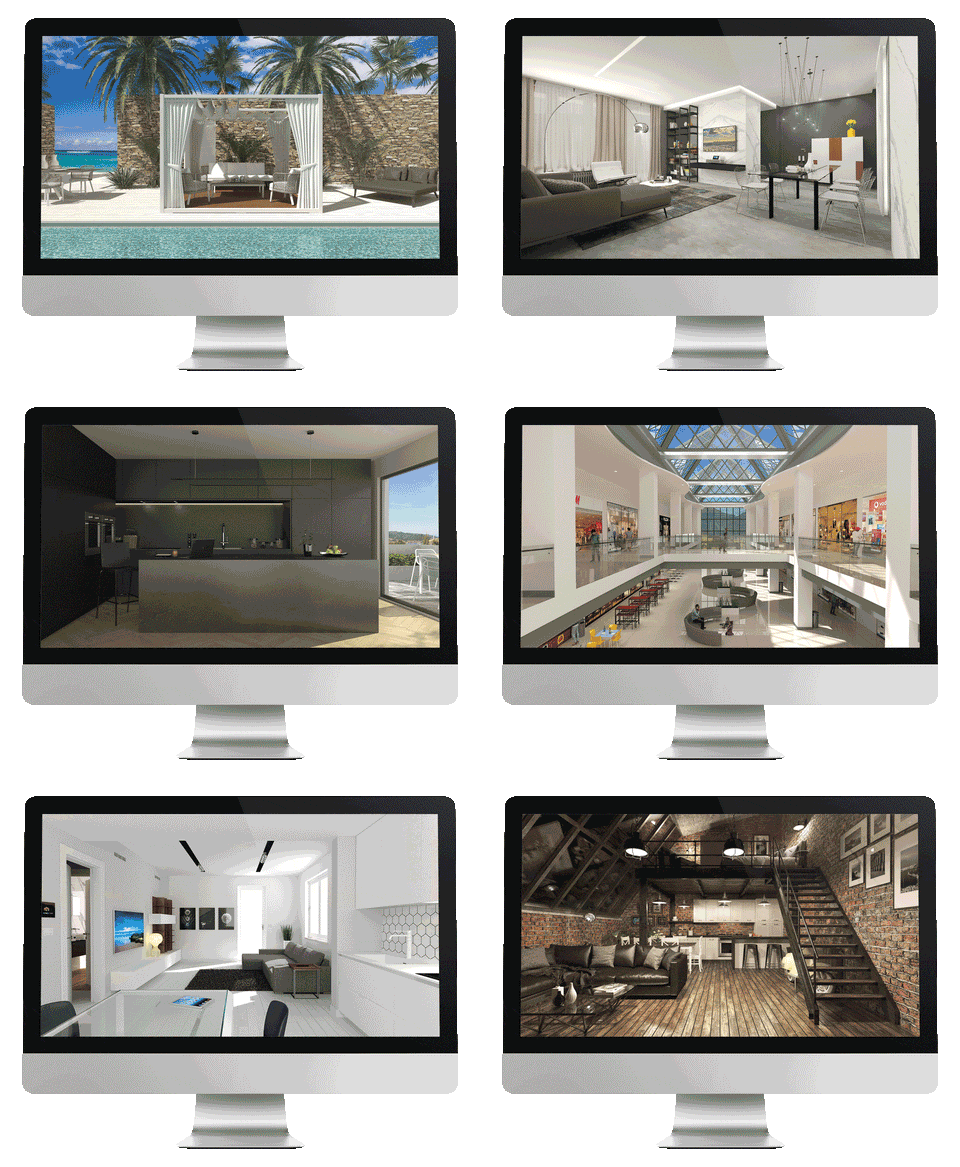
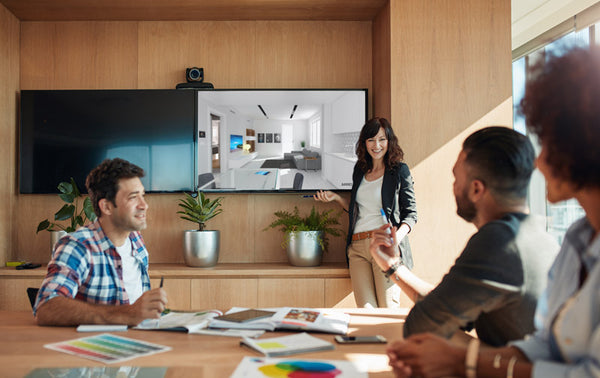
ArredoCAD Designer improves the 3D design and presentation experience. The software's advanced features and ease of use make it the ideal marketing tool for any design and architecture sector. With ArredoCAD you can best illustrate projects to customers and easily share them remotely. The high quality renderings made with ArredoCAD are easily viewable from any device. You can also browse projects in RealTime Render and Virtual Reality modes. In a few seconds you can offer customers the incredible experience of visiting the proposals from the insidedesigned. For these reasons, ArredoCAD is a precious resource for:
|
 |
The advantages of ArredoCAD for your projects
ArredoCAD Designer offers advanced features for 3D design and very high levels of customization. The constant updating and speed of execution allow you to easily recreate any environment down to the smallest detail, including the furnishing elements of any company. In addition to the design of spaces and furnishings, you can give the environment the atmosphere you want through the study of lighting. The result is high quality previews, which can be shared and browsed, which best express your creative proposal.
|
|
High quality render
|
Quick and easy planning
|
 |
 |
Maximum customization
|
Marketing and customer presentation
|
|
 |
Real Time Render and Virtual Reality
|
Made in Italy design and furniture
|
 |
What's New
The new release of ArredoCAD is characterized above all by the optimization of the work flow, the interactive and high-quality presentation of the projects to customers and by the design speed.
|
|
Import, export, share. And design at maximum speed
Improvements to the user archive now allow to create different user archives, share them among PCs connected through a network and make them accessible to other users that use ArredoCAD in other PC workstations, so the whole group is always synchronized. During rendering the parameters of various inserted materials can now be modified and updated at the same time (and not one by one as was the case before). Some workflows have been optimized and boosted and many operations like Undo/Redo or visualizing objects with hidden lines have been sped up. |
Video of the project in render quality and interactive product sheets in the Virtual Tour 360The Virtual Tour 360, an additional plugin (to be purchased separately) has also been updated and boosted. From now on, you can not only add multimedia elements (pdf, videos, web links, images and audio files) to the virtual path, but also create and insert interactive and multimedia product sheets. It is up to the final user to define the template and the fields of the product sheet that can contain texts, images (also multiple sliding images), links to websites, documents that can be downloaded like technical sheet and various information on the product (description, price, finishes, measurements, etc.). A true gem with several applications, useful for example to create a virtual tour of a showroom […], with the possibility to match product sheets to an e-shop, or for the Virtual Tours of museums or art galleries, where for each artwork the related information sheet can be displayed. |
|

|
|
Features
- Video manual und self-learning tutorial
- Multi-room plan design (inter-walls, out-of-square walls, curved walls).
Plant import in format: DXF, DWG 2D, JPEG and PNG. - Modern and traditional libraries of kitchens, living areas, bedrooms, bedrooms, wardrobes, walk-in closets, bathrooms, offices, accessories.
- Customization of library measurements and unlimited saving of configuration cards (for each manufacturer / model).
- Customization of measures of individual pieces of furniture in width, depth and height.
- Customization of measures of individual pieces of furniture in width, depth and height.
- Color and material libraries (woods, glass, lacquers, metals, RAL and NCS color scale, etc.).
- Floor and wall coverings library (tiles, terracotta, decorations, parquet, wallpaper, etc.).
- Management of floor and wall laying schemes.
- Import of new floor and wall textures in jpg, bmp or png format.
- Import of new textures (materials) in jpg, bmp or png format.
- Material characteristics editor.
- Import of new 3D elements in .SKP, .OBJ and .3DS format (additional plugin).
- Interactive 3D navigation within the project, in real time and in high resolution.
- High quality rendering with D-Ray.
- High quality panoramic render, with the possibility of moving 360 ° in the rendered project.
- Real-time export of the 3D scene for Virtual Reality viewers (Oculus Rift, to be purchased separately).
- 3D perspective and axonometric views with automatic dimensions.
- Export in DXF 2D / 3D, VRML 2.0, PLT, SKP formats.
- Light point management (diffused, spot, quadlight): automatic, manual insertion, color and intensity adjustment of light points.
- Solid modeler base for creating new three-dimensional elements.
- Creation of new elements from existing ones.
- Explode Element function to break it down and modify it in its components.
- Merge Block function for grouping and creating new elements.
- User Archive for saving new elements (created with ArredoCAD, imported from outside or modified).
- Automatic insertion of tops, plinths, backsplashes, profiles and appliances.
- Change of handles and generic automatisms on the single elements.
- Automatic calculation of out-of-square in kitchens.
- Automatic cutting of elements in the case of masonry columns, attics, etc.
- Automatic creation of technical prints (plans, elevations, 3D views, top holes, oversized etc.) with customized logo.
- Manual creation of project sections for printing or pagination in Smart | Print.
- Export of technical prints in JPEG, PDF and WMF format.
- Smart | Print function to quickly layout multiple prints on a single sheet.
- Sending of orders that can be parameterized on request to shop management systems.
- Memo-List to match the codes and prices of the various manufacturers to the elements of ArredoCAD.
Compare
Compare ArredoCAD Designer and ArredoCAD Kitchen
|
Functions and elements libraries |
||
|
Program functionalities |
✔ |
✔ |
|
High quality rendering and Virtual Tour |
✔ |
✔ |
|
Plug-in activation |
✔ |
✔ |
|
Textures and coverings (15.000 textures) |
✔ |
✔ |
|
Kitchen elements library |
✔ |
✔ |
|
Accessories: Doors and windows Architectonic elements Kitchen tables and peninsulas Modern and traditional chairs, kitchen stools Carpets and curtains Lamps and pendants Kitchen linear elements (worktops, plinths etc.) Household appliances and sinks Hoods, fireplaces, stoves and radiators Kitchen accessories and generic accessories Limitations Cutting polygons Lights and luminous polygons |
✔ |
✔ |
|
Other accessories: Living zone and garden tables, outdoor furniture Office and living zone chairs, armchairs, sofas Bathroom accessories Shop accessories Autos-bikes |
✔ |
|
|
Library for: Wardrobes, Beds, Beds for kids, Walk-in closets, Living zones, Bathrooms, Classic elements and Offices |
✔ |
|
|
Library for partner products: Bonaldo, Bauline, Cantori, Cattelan, Desalto, Edra, Flos, Gruppo Garofoli, Molteni, Moroso, Porada, Rintal |
✔ |
|


Webinars
Latest ArredoCAD Designer Webinar from Novedge
Novedge Webinar #305: A Complete Interior Design Software, VR included!
Novedge Webinar #283: Finally a 3D Design Software for Interior Design!
HW Suggestions
Recommended System Specification
NOVEDGE is an authorized HP reseller that offers a wide range of professional quality notebooks and workstations to meet your hardware needs.
In addition, NOVEDGE works with High Speed Computing to customize workstations to give you the perfect hardware for your design needs at a competitive price. Contact us to discuss pre-built and custom configuration workstations and laptops.
You can find our selection of high performance hardware products at this LINK.
Below you can try our free experimental AI Service, which makes computer hardware recommendations for selected design software products. Our goal is to make it as good as a first line support human person, and it can work for you 24/7. Please give us your feedback to help make this service as good as it can be.
If you need help with sales instead, we have an excellent human team that will be happy to help you find the products best fit your needs from our very large selection of standard and custom workstations and laptops. You can get in touch with them by email at [email protected] or phone at 1-415-848-9018.
If you do not get a satisfactory answer try to rephrase the question in a more specific/detailed way
This service is a prototype and therefore it may return incorrect or incomplete answers. Furthermore, Artificial Intelligence is intrinsically prone to occasional mistakes, misunderstandings, and incomplete answers at least as much as human intelligence is.
This experimental service is offered as is and free of charge as a demonstration of the capabilities of Artificial Intelligence as an automated tool for support. Although the information found on this system has been produced and processed from sources believed to be reliable, no warranty, express or implied, is made regarding accuracy, adequacy, completeness, legality, reliability, or usefulness of any information.
Original: $165.00
-70%$165.00
$49.50
Description
Overview
ArredoCAD Designer has been specially designed for creating interiors and with this 3D interior design software, you can reproduce the models of any manufacturer or create any design or architectural solution according to the different needs of your customers, making possible to draw and furnish a single room as well as an entire flat. The huge libraries containing furniture, doors, materials and finishes, configurable according to the needs of the user, are constantly updated and can be enriched through 3D objects imported from 3ds Max or Sketchup. |
|
3D presentations that can be navigated and shared remotely
ArredoCAD Designer improves the 3D design and presentation experience. The software's advanced features and ease of use make it the ideal marketing tool for any design and architecture sector. With ArredoCAD you can best illustrate projects to customers and easily share them remotely. The high quality renderings made with ArredoCAD are easily viewable from any device. You can also browse projects in RealTime Render and Virtual Reality modes. In a few seconds you can offer customers the incredible experience of visiting the proposals from the insidedesigned. For these reasons, ArredoCAD is a precious resource for:
|
|
The advantages of ArredoCAD for your projects
ArredoCAD Designer offers advanced features for 3D design and very high levels of customization. The constant updating and speed of execution allow you to easily recreate any environment down to the smallest detail, including the furnishing elements of any company. In addition to the design of spaces and furnishings, you can give the environment the atmosphere you want through the study of lighting. The result is high quality previews, which can be shared and browsed, which best express your creative proposal.
|
|
High quality render
|
Quick and easy planning
|
|
|
Maximum customization
|
Marketing and customer presentation
|
|
|
Real Time Render and Virtual Reality
|
Made in Italy design and furniture
|
|
What's New
The new release of ArredoCAD is characterized above all by the optimization of the work flow, the interactive and high-quality presentation of the projects to customers and by the design speed.
|
|
Import, export, share. And design at maximum speed
Improvements to the user archive now allow to create different user archives, share them among PCs connected through a network and make them accessible to other users that use ArredoCAD in other PC workstations, so the whole group is always synchronized. During rendering the parameters of various inserted materials can now be modified and updated at the same time (and not one by one as was the case before). Some workflows have been optimized and boosted and many operations like Undo/Redo or visualizing objects with hidden lines have been sped up. |
Video of the project in render quality and interactive product sheets in the Virtual Tour 360The Virtual Tour 360, an additional plugin (to be purchased separately) has also been updated and boosted. From now on, you can not only add multimedia elements (pdf, videos, web links, images and audio files) to the virtual path, but also create and insert interactive and multimedia product sheets. It is up to the final user to define the template and the fields of the product sheet that can contain texts, images (also multiple sliding images), links to websites, documents that can be downloaded like technical sheet and various information on the product (description, price, finishes, measurements, etc.). A true gem with several applications, useful for example to create a virtual tour of a showroom […], with the possibility to match product sheets to an e-shop, or for the Virtual Tours of museums or art galleries, where for each artwork the related information sheet can be displayed. |
|
|
|
|
Features
- Video manual und self-learning tutorial
- Multi-room plan design (inter-walls, out-of-square walls, curved walls).
Plant import in format: DXF, DWG 2D, JPEG and PNG. - Modern and traditional libraries of kitchens, living areas, bedrooms, bedrooms, wardrobes, walk-in closets, bathrooms, offices, accessories.
- Customization of library measurements and unlimited saving of configuration cards (for each manufacturer / model).
- Customization of measures of individual pieces of furniture in width, depth and height.
- Customization of measures of individual pieces of furniture in width, depth and height.
- Color and material libraries (woods, glass, lacquers, metals, RAL and NCS color scale, etc.).
- Floor and wall coverings library (tiles, terracotta, decorations, parquet, wallpaper, etc.).
- Management of floor and wall laying schemes.
- Import of new floor and wall textures in jpg, bmp or png format.
- Import of new textures (materials) in jpg, bmp or png format.
- Material characteristics editor.
- Import of new 3D elements in .SKP, .OBJ and .3DS format (additional plugin).
- Interactive 3D navigation within the project, in real time and in high resolution.
- High quality rendering with D-Ray.
- High quality panoramic render, with the possibility of moving 360 ° in the rendered project.
- Real-time export of the 3D scene for Virtual Reality viewers (Oculus Rift, to be purchased separately).
- 3D perspective and axonometric views with automatic dimensions.
- Export in DXF 2D / 3D, VRML 2.0, PLT, SKP formats.
- Light point management (diffused, spot, quadlight): automatic, manual insertion, color and intensity adjustment of light points.
- Solid modeler base for creating new three-dimensional elements.
- Creation of new elements from existing ones.
- Explode Element function to break it down and modify it in its components.
- Merge Block function for grouping and creating new elements.
- User Archive for saving new elements (created with ArredoCAD, imported from outside or modified).
- Automatic insertion of tops, plinths, backsplashes, profiles and appliances.
- Change of handles and generic automatisms on the single elements.
- Automatic calculation of out-of-square in kitchens.
- Automatic cutting of elements in the case of masonry columns, attics, etc.
- Automatic creation of technical prints (plans, elevations, 3D views, top holes, oversized etc.) with customized logo.
- Manual creation of project sections for printing or pagination in Smart | Print.
- Export of technical prints in JPEG, PDF and WMF format.
- Smart | Print function to quickly layout multiple prints on a single sheet.
- Sending of orders that can be parameterized on request to shop management systems.
- Memo-List to match the codes and prices of the various manufacturers to the elements of ArredoCAD.
Compare
Compare ArredoCAD Designer and ArredoCAD Kitchen
|
Functions and elements libraries |
||
|
Program functionalities |
✔ |
✔ |
|
High quality rendering and Virtual Tour |
✔ |
✔ |
|
Plug-in activation |
✔ |
✔ |
|
Textures and coverings (15.000 textures) |
✔ |
✔ |
|
Kitchen elements library |
✔ |
✔ |
|
Accessories: Doors and windows Architectonic elements Kitchen tables and peninsulas Modern and traditional chairs, kitchen stools Carpets and curtains Lamps and pendants Kitchen linear elements (worktops, plinths etc.) Household appliances and sinks Hoods, fireplaces, stoves and radiators Kitchen accessories and generic accessories Limitations Cutting polygons Lights and luminous polygons |
✔ |
✔ |
|
Other accessories: Living zone and garden tables, outdoor furniture Office and living zone chairs, armchairs, sofas Bathroom accessories Shop accessories Autos-bikes |
✔ |
|
|
Library for: Wardrobes, Beds, Beds for kids, Walk-in closets, Living zones, Bathrooms, Classic elements and Offices |
✔ |
|
|
Library for partner products: Bonaldo, Bauline, Cantori, Cattelan, Desalto, Edra, Flos, Gruppo Garofoli, Molteni, Moroso, Porada, Rintal |
✔ |
|
Webinars
Latest ArredoCAD Designer Webinar from Novedge
Novedge Webinar #305: A Complete Interior Design Software, VR included!
Novedge Webinar #283: Finally a 3D Design Software for Interior Design!
HW Suggestions
Recommended System Specification
NOVEDGE is an authorized HP reseller that offers a wide range of professional quality notebooks and workstations to meet your hardware needs.
In addition, NOVEDGE works with High Speed Computing to customize workstations to give you the perfect hardware for your design needs at a competitive price. Contact us to discuss pre-built and custom configuration workstations and laptops.
You can find our selection of high performance hardware products at this LINK.
Below you can try our free experimental AI Service, which makes computer hardware recommendations for selected design software products. Our goal is to make it as good as a first line support human person, and it can work for you 24/7. Please give us your feedback to help make this service as good as it can be.
If you need help with sales instead, we have an excellent human team that will be happy to help you find the products best fit your needs from our very large selection of standard and custom workstations and laptops. You can get in touch with them by email at [email protected] or phone at 1-415-848-9018.
If you do not get a satisfactory answer try to rephrase the question in a more specific/detailed way
This service is a prototype and therefore it may return incorrect or incomplete answers. Furthermore, Artificial Intelligence is intrinsically prone to occasional mistakes, misunderstandings, and incomplete answers at least as much as human intelligence is.
This experimental service is offered as is and free of charge as a demonstration of the capabilities of Artificial Intelligence as an automated tool for support. Although the information found on this system has been produced and processed from sources believed to be reliable, no warranty, express or implied, is made regarding accuracy, adequacy, completeness, legality, reliability, or usefulness of any information.