✨ New Arrivals Just Dropped!Explore
HomeStore

CorelDRAW Technical Suite 365-Day - Subscription License

CorelDRAW Technical Suite 365-Day - Subscription License


Details matter


Expand what’s possible in visual communication with CorelDRAW® Technical Suite, a comprehensive collection of applications for high-impact technical design and documentation.

  • Precise - Find a range of precise illustration and design tools to create detailed technical documentation with exact specifications.
  • Productive - Enjoy a seamless workflow from opening 2D and 3D source files, photos, documents and data, to producing, reviewing, and publishing technical communications.
  • Comprehensive - Count on this complete suite of professional design applications for authoring technical documentation, reviewing, and publishing detailed illustrations with ease.
  • Collaborative - Connect with cross-functional teams and clients using popular authoring systems integration—from project creation and authoring to collaborative review and output.


A collection of versatile design and drafting applications


Corel DESIGNER™
Technical design & illustration
Achieve accurate results with powerful technical design and illustration tools.
CorelDRAW®
Graphics & layout design
Tackle any project with this complete graphic design application for vector illustration, page layout and more.
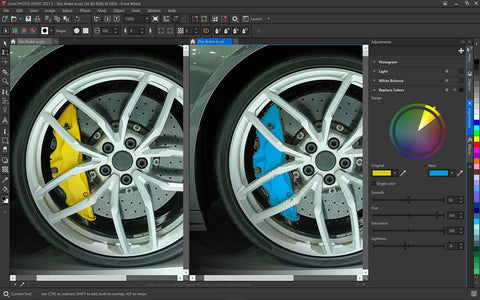
Corel PHOTO-PAINT™
Photo editing & digital painting
Make the most of your photos with robust photo-editing capabilities.
XVL Studio Corel Edition
3D repurposing
Add context to your technical projects by using 3D views and models in your illustrations.
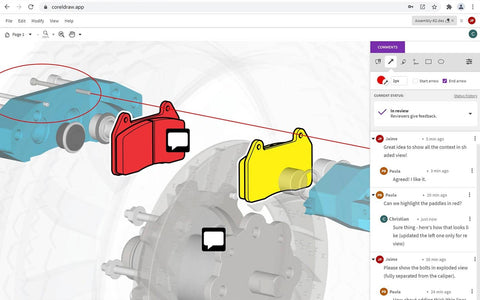
CorelDRAW.app™
Vector illustration web application
Use CorelDRAW.app to gather feedback from a client, or to access your work remotely when you’re not near your computer.
CorelDRAW.app for iPad
Vector illustration web application
Rely on the iPad app for convenient collaborative file review or to design on the go.
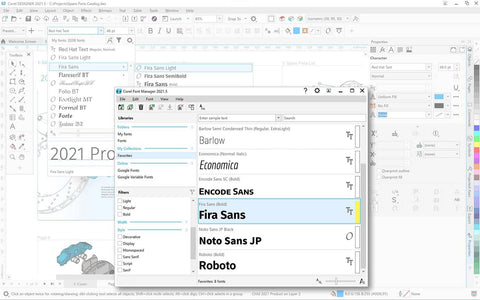
Corel® Font Manager
Font exploration and management tool
CAPTURE™
Screen capture tool
Capture and save images of your computer screen, including the entire screen, individual windows, or menu lists, in one click.
AfterShot™ 3 HDR
RAW photo editor
Make professional-grade corrections and enhancements to RAW or JPEG photos and create high dynamic range images. (Available in English, German and Japanese)


Why choose CorelDRAW Technical Suite?


This suite will take your technical illustrations from concept to compliance.

  • Complete suite for visual technical communication - Create everything from precise technical illustrations with Corel DESIGNER to stand-out marketing collateral with CorelDRAW. Edit photos for documentation with Corel PHOTO-PAINT and add screenshots with CAPTURE. When you’re ready to share files for collaborative review and approval, use CorelDRAW.app for web or iPad to streamline the stakeholder feedback process.
  • Graphically rich technical design tools - Access dedicated illustration and design tools that ensure accuracy for isometric drawing, detailed callouts, advanced dimensioning, and so much more. Find features and functionality that enable technical illustrators, writers and graphics users to produce just about anything— from detailed schematics and floor plans to complex maintenance manuals and spare parts pages.
  • Repurpose key asset - Reuse 3D models with the integrated XVL Studio Corel Edition, and the optional XVL Studio 3D CAD Corel Edition add-on for advanced 3D CAD assembly formats. Insert 3D models, data tables, and .DES or .CDR illustrations as linked or embedded objects into Corel DESIGNER for instant access, sharing and reference.
  • Advanced standards compliance - Ensure compliance with various standards-based systems with support for technical publication standards. Expand your reach with Translation Memory System (TMS) support. Publish S1000D (incl. Issue 5.0) or ATA iSpec 2200 compliant IETPs, and deliver technical communication projects that feature 3D PDF and PDF/A support.
  • Extensive file compatibility - Technical graphics professionals can access critical data from various sources and deliver technical files in a readable format with support for widely used file formats, including CGM, WebCGM, 3D PDF, and SVG with new interactive possibilities. Import from, and export to, an expansive list of file formats, including EPS, DWG, TIFF, PNG, and JPEG.


What's New


Experience a seamless transition from 3D design to illustration

Turn repurposed 3D engineering data into detailed technical illustrations with ease.

  • 3-Point Thread Creation tool - By referencing the center and edges of a threadless bolt, the new 3-Point Thread Creation tool accurately snaps to the sides of your bolt as you drag the thread along it.
  • Remove Border tool - The new Remove Border tool takes effortless thread and well creation even further, by removing the redundant outer lines of the projected shape with one click.
  • XVL Studio enhancements - Now links on parts in XVL Studio will be converted to HTML links when imported to Corel DESIGNER, and variable part names used in the Assembly Tree will map to Corel DESIGNER for added consistency.

Work faster with a reimagined approach to technical illustration

Experience streamlined technical illustration with your frequently used tools concentrated where they matter most–at your fingertips.

  • Projection bookmarks - Pin custom perspective settings on your illustration for later and recall them by clicking the bookmark indicator on your drawing.
  • Projection shortcut - Project shapes in and out of parallel perspective instantaneously with a handy shortcut.
  • Reconfigured Projected Axes docker - Move elements along a projected axis more intuitively without the need to switch between dockers or other UI controls

Create complete spare parts pages with impressive new functionality

Create detailed spare parts pages with complete control, thanks to a series of noteworthy new features purpose-built to power discrete manufacturing workflows.

  • Interactive SVG support - Convey parts information with even more clarity by linking drawing callouts to table rows, so that on hover, the corresponding information is highlighted.
  • Sources docker enhancements - Now you can import .DES, .CDR, and spreadsheet files into Corel DESIGNER’s Sources docker to couple technical illustrations with specifications in tables.
  • Interactive SVG export - Publish fully interactive documentation online, thanks to an enhanced Export docker with support for interactive SVG export.

Work better together with collaborative review and approval

Stay connected with colleagues and clients in powerful new ways as remote work becomes the new normal.

  • Project Dashboard - Intuitively store, organize, and share cloud files using the new project dashboard.
  • Live Comments - Gather live comments and annotations from contributors directly in your .DES or .CDR design file.

Dynamic asset management

Ensure you’re always working with the most current symbols, thanks to an impressive new asset management workflow. Create a single source of truth for design assets by sharing symbols across projects and with teams, and syncing updates when changes are made by you or others.

Transform technical designs into compelling marketing assets

This fully loaded suite of dedicated applications extends the reach of visual communications.

  • Draw in Perspective - Add creative touches in 1, 2 or 3-point perspective, in Corel DESIGNER and CorelDRAW, using the new Draw in Perspective feature.
  • Multipage View - View, manage, and edit all your project’s digital assets in one flexible design space.
  • Enhanced Photo-Editing - Get quick access to your most frequently used filters and apply critical image adjustments non-destructively, thanks the new Adjustments docker.


Tools for high-impact visual communication


From manufacturing and engineering to architecture and high tech, we’ve got you covered with timesaving illustration features and game-changing tools to help reach new levels of productivity.

Precise

  • Axonometric drawing tools - Create isometric or other parallel projected technical illustrations for assembly and maintenance instructions by dynamically drawing on a projected plane. Project your existing planar objects to a desired plane in lieu of manual calculations.
  • Advanced dimension tools - Eliminate the need to draw and project dimension objects in multiple steps thanks to the dimension tools. Display precise measurement values in building plans and more. Add context with projected arrows in dimensions and leader lines.
  • Streamlined callout creation - Track essential design details and have Callouts dynamically update and change when based on object metadata. Connect or "stick" to source objects as they are modified with Sticky callouts. The Legless Callouts are perfect to add when a callout doesn’t need a leader line
  • Drawing scale control - Create illustrations and diagrams to scale with the drawing scale control. View the active drawing scale, switch to another preset, or set a custom scale. Corel DESIGNER retains the drawing scale when importing a vector illustration from a 3D model view so imported views are placed at scale.

Productive

  • Hotspot capabilities - Add interactive functions to callout shapes in technical publications with the callout drawing tool in Corel DESIGNER. Draw and attach callouts to nested groups by automatically applying hotspots and object information on callouts, saving you time
  • Wrap objects around cylinders - The Wrap tool makes it quick and easy to precisely wrap an object around a cylinder or ellipse, like adding a label to a bottle
  • Object Styles and presets - Ensure a consistent look, style, and layout throughout your design projects with Object Styles, Color Styles and Color Harmonies. Explore preloaded Style Sets that follow S1000D technical illustration standards, complete with quick keys for a faster workflow.
  • Equation Editor - Manage mathematical equations as editable elements using the integrated Equation Editor. Mathematical and scientific formulas can be inserted and displayed in the drawing, and then modified as needed. Existing equations from older CorelDRAW documents can be opened or imported for use in Corel DESIGNER equations.
  • Straighten and adjust photos interactively - Rotate crooked images by interactively aligning a straightening bar to an element in the photo or specifying an angle of rotation. Use the interactive Perspective Correction tool to adjust the perspective of buildings, landmarks, or objects in photos.

Innovative

  • Thick and thin line drawing - Easily add depth to an isometric with the time saving Thick and Thin Lines feature. Automatically apply two line weights at once and reverse them in a click.
  • Scale halos with outlines - When it comes to adding halos on lines, enjoy the ability to lock the ratio between your outline width and halo width for seamless scaling.
  • Add Perspective effect - Quickly create the illusion of distance and depth by applying perspective to bitmaps, vector objects, or both, directly in the drawing window. It’s an ingenious tool to showcase technical illustrations in real world scenarios.
  • Apply envelopes to bitmaps - Shape a bitmap interactively by placing it in an envelope and dragging its nodes. Quickly and seamlessly blend a bitmap into an illustration by using envelope presets or crafting a custom envelope from scratch.
  • GPU accelerated vector previews - Reposition and edit complex vector shapes without taxing your system’s resources. Using the graphics processing unit (GPU) may accelerate the display, editing, and manipulation of graphics in Corel DESIGNER, CorelDRAW and Corel PHOTO-PAINT on some machines.
  • Symmetry drawing mode - Create a range of symmetrical designs, from simple objects to complex effects in real time, and boost your productivity by automating what is usually a very time-consuming workflow.

Compatible

  • 3D PDF publishing - Publish to 3D PDF with interactive viewing of 3D content, combined with other visual and text elements. Export from Corel DESIGNER to 3D PDF to generate output with pertinent data and graphics in one document for cross- media publishing. 3D PDF files can be viewed with free PDF reader applications.
  • Advanced automation capabilities - Create macros and add-ins with the integrated Microsoft Visual Studio Tools for Applications (VSTA), Visual Basic for Applications (VBA), and JavaScript support. With the enhanced automation interface, developers can create utilities and macros that can interact with the drawing page, and enhance in-product applications.
  • Translation Memory System (TMS) workflow - Produce illustrations that contain descriptive text, then output directly to the Translation Memory System (TMS), and process in Corel DESIGNER for translated results to use in multilingual global technical publication

Designed from the ground up for Windows

  • Pen - Work quickly and efficiently with Windows Real-Time Stylus pen-compatible tablets, such as the Microsoft Surface, in addition to the Wacom tablet and devices.
  • Touch - Create quick adjustments using touch or a stylus. The Touch workspace maximizes the size of your drawing window by displaying only the tools and commands used most often, plus you can pan and zoom with a single gesture.
  • Dial - Enjoy support for wheel devices, such as the Microsoft Surface Dial. Experience an alternative and more intuitive way of working in Corel DESIGNER and CorelDRAW by using touch and dial alone. Put your keyboard aside and try the contextual onscreen UI.


HW Suggestions


Recommended System Specification


NOVEDGE is an authorized HP reseller that offers a wide range of professional quality notebooks and workstations to meet your hardware needs.

In addition, NOVEDGE works with High Speed ​​Computing to customize workstations to give you the perfect hardware for your design needs at a competitive price. Contact us to discuss pre-built and custom configuration workstations and laptops.

You can find our selection of high performance hardware products at this LINK.

Below you can try our free experimental AI Service, which makes computer hardware recommendations for selected design software products. Our goal is to make it as good as a first line support human person, and it can work for you 24/7. Please give us your feedback to help make this service as good as it can be.

If you need help with sales instead, we have an excellent human team that will be happy to help you find the products best fit your needs from our very large selection of standard and custom workstations and laptops. You can get in touch with them by email at [email protected] or phone at 1-415-848-9018.

Suggested Computer Configurations For:

If you do not get a satisfactory answer try to rephrase the question in a more specific/detailed way

This service is a prototype and therefore it may return incorrect or incomplete answers. Furthermore, Artificial Intelligence is intrinsically prone to occasional mistakes, misunderstandings, and incomplete answers at least as much as human intelligence is.
This experimental service is offered as is and free of charge as a demonstration of the capabilities of Artificial Intelligence as an automated tool for support. Although the information found on this system has been produced and processed from sources believed to be reliable, no warranty, express or implied, is made regarding accuracy, adequacy, completeness, legality, reliability, or usefulness of any information.


Select Title
From $119.70

Original: $399.00

-70%
CorelDRAW Technical Suite 365-Day - Subscription License

$399.00

$119.70
Product image 1

Description


Details matter


Expand what’s possible in visual communication with CorelDRAW® Technical Suite, a comprehensive collection of applications for high-impact technical design and documentation.

  • Precise - Find a range of precise illustration and design tools to create detailed technical documentation with exact specifications.
  • Productive - Enjoy a seamless workflow from opening 2D and 3D source files, photos, documents and data, to producing, reviewing, and publishing technical communications.
  • Comprehensive - Count on this complete suite of professional design applications for authoring technical documentation, reviewing, and publishing detailed illustrations with ease.
  • Collaborative - Connect with cross-functional teams and clients using popular authoring systems integration—from project creation and authoring to collaborative review and output.


A collection of versatile design and drafting applications


Corel DESIGNER™
Technical design & illustration
Achieve accurate results with powerful technical design and illustration tools.
CorelDRAW®
Graphics & layout design
Tackle any project with this complete graphic design application for vector illustration, page layout and more.
Corel PHOTO-PAINT™
Photo editing & digital painting
Make the most of your photos with robust photo-editing capabilities.
XVL Studio Corel Edition
3D repurposing
Add context to your technical projects by using 3D views and models in your illustrations.
CorelDRAW.app™
Vector illustration web application
Use CorelDRAW.app to gather feedback from a client, or to access your work remotely when you’re not near your computer.
CorelDRAW.app for iPad
Vector illustration web application
Rely on the iPad app for convenient collaborative file review or to design on the go.
Corel® Font Manager
Font exploration and management tool
CAPTURE™
Screen capture tool
Capture and save images of your computer screen, including the entire screen, individual windows, or menu lists, in one click.
AfterShot™ 3 HDR
RAW photo editor
Make professional-grade corrections and enhancements to RAW or JPEG photos and create high dynamic range images. (Available in English, German and Japanese)


Why choose CorelDRAW Technical Suite?


This suite will take your technical illustrations from concept to compliance.

  • Complete suite for visual technical communication - Create everything from precise technical illustrations with Corel DESIGNER to stand-out marketing collateral with CorelDRAW. Edit photos for documentation with Corel PHOTO-PAINT and add screenshots with CAPTURE. When you’re ready to share files for collaborative review and approval, use CorelDRAW.app for web or iPad to streamline the stakeholder feedback process.
  • Graphically rich technical design tools - Access dedicated illustration and design tools that ensure accuracy for isometric drawing, detailed callouts, advanced dimensioning, and so much more. Find features and functionality that enable technical illustrators, writers and graphics users to produce just about anything— from detailed schematics and floor plans to complex maintenance manuals and spare parts pages.
  • Repurpose key asset - Reuse 3D models with the integrated XVL Studio Corel Edition, and the optional XVL Studio 3D CAD Corel Edition add-on for advanced 3D CAD assembly formats. Insert 3D models, data tables, and .DES or .CDR illustrations as linked or embedded objects into Corel DESIGNER for instant access, sharing and reference.
  • Advanced standards compliance - Ensure compliance with various standards-based systems with support for technical publication standards. Expand your reach with Translation Memory System (TMS) support. Publish S1000D (incl. Issue 5.0) or ATA iSpec 2200 compliant IETPs, and deliver technical communication projects that feature 3D PDF and PDF/A support.
  • Extensive file compatibility - Technical graphics professionals can access critical data from various sources and deliver technical files in a readable format with support for widely used file formats, including CGM, WebCGM, 3D PDF, and SVG with new interactive possibilities. Import from, and export to, an expansive list of file formats, including EPS, DWG, TIFF, PNG, and JPEG.


What's New


Experience a seamless transition from 3D design to illustration

Turn repurposed 3D engineering data into detailed technical illustrations with ease.

  • 3-Point Thread Creation tool - By referencing the center and edges of a threadless bolt, the new 3-Point Thread Creation tool accurately snaps to the sides of your bolt as you drag the thread along it.
  • Remove Border tool - The new Remove Border tool takes effortless thread and well creation even further, by removing the redundant outer lines of the projected shape with one click.
  • XVL Studio enhancements - Now links on parts in XVL Studio will be converted to HTML links when imported to Corel DESIGNER, and variable part names used in the Assembly Tree will map to Corel DESIGNER for added consistency.

Work faster with a reimagined approach to technical illustration

Experience streamlined technical illustration with your frequently used tools concentrated where they matter most–at your fingertips.

  • Projection bookmarks - Pin custom perspective settings on your illustration for later and recall them by clicking the bookmark indicator on your drawing.
  • Projection shortcut - Project shapes in and out of parallel perspective instantaneously with a handy shortcut.
  • Reconfigured Projected Axes docker - Move elements along a projected axis more intuitively without the need to switch between dockers or other UI controls

Create complete spare parts pages with impressive new functionality

Create detailed spare parts pages with complete control, thanks to a series of noteworthy new features purpose-built to power discrete manufacturing workflows.

  • Interactive SVG support - Convey parts information with even more clarity by linking drawing callouts to table rows, so that on hover, the corresponding information is highlighted.
  • Sources docker enhancements - Now you can import .DES, .CDR, and spreadsheet files into Corel DESIGNER’s Sources docker to couple technical illustrations with specifications in tables.
  • Interactive SVG export - Publish fully interactive documentation online, thanks to an enhanced Export docker with support for interactive SVG export.

Work better together with collaborative review and approval

Stay connected with colleagues and clients in powerful new ways as remote work becomes the new normal.

  • Project Dashboard - Intuitively store, organize, and share cloud files using the new project dashboard.
  • Live Comments - Gather live comments and annotations from contributors directly in your .DES or .CDR design file.

Dynamic asset management

Ensure you’re always working with the most current symbols, thanks to an impressive new asset management workflow. Create a single source of truth for design assets by sharing symbols across projects and with teams, and syncing updates when changes are made by you or others.

Transform technical designs into compelling marketing assets

This fully loaded suite of dedicated applications extends the reach of visual communications.

  • Draw in Perspective - Add creative touches in 1, 2 or 3-point perspective, in Corel DESIGNER and CorelDRAW, using the new Draw in Perspective feature.
  • Multipage View - View, manage, and edit all your project’s digital assets in one flexible design space.
  • Enhanced Photo-Editing - Get quick access to your most frequently used filters and apply critical image adjustments non-destructively, thanks the new Adjustments docker.


Tools for high-impact visual communication


From manufacturing and engineering to architecture and high tech, we’ve got you covered with timesaving illustration features and game-changing tools to help reach new levels of productivity.

Precise

  • Axonometric drawing tools - Create isometric or other parallel projected technical illustrations for assembly and maintenance instructions by dynamically drawing on a projected plane. Project your existing planar objects to a desired plane in lieu of manual calculations.
  • Advanced dimension tools - Eliminate the need to draw and project dimension objects in multiple steps thanks to the dimension tools. Display precise measurement values in building plans and more. Add context with projected arrows in dimensions and leader lines.
  • Streamlined callout creation - Track essential design details and have Callouts dynamically update and change when based on object metadata. Connect or "stick" to source objects as they are modified with Sticky callouts. The Legless Callouts are perfect to add when a callout doesn’t need a leader line
  • Drawing scale control - Create illustrations and diagrams to scale with the drawing scale control. View the active drawing scale, switch to another preset, or set a custom scale. Corel DESIGNER retains the drawing scale when importing a vector illustration from a 3D model view so imported views are placed at scale.

Productive

  • Hotspot capabilities - Add interactive functions to callout shapes in technical publications with the callout drawing tool in Corel DESIGNER. Draw and attach callouts to nested groups by automatically applying hotspots and object information on callouts, saving you time
  • Wrap objects around cylinders - The Wrap tool makes it quick and easy to precisely wrap an object around a cylinder or ellipse, like adding a label to a bottle
  • Object Styles and presets - Ensure a consistent look, style, and layout throughout your design projects with Object Styles, Color Styles and Color Harmonies. Explore preloaded Style Sets that follow S1000D technical illustration standards, complete with quick keys for a faster workflow.
  • Equation Editor - Manage mathematical equations as editable elements using the integrated Equation Editor. Mathematical and scientific formulas can be inserted and displayed in the drawing, and then modified as needed. Existing equations from older CorelDRAW documents can be opened or imported for use in Corel DESIGNER equations.
  • Straighten and adjust photos interactively - Rotate crooked images by interactively aligning a straightening bar to an element in the photo or specifying an angle of rotation. Use the interactive Perspective Correction tool to adjust the perspective of buildings, landmarks, or objects in photos.

Innovative

  • Thick and thin line drawing - Easily add depth to an isometric with the time saving Thick and Thin Lines feature. Automatically apply two line weights at once and reverse them in a click.
  • Scale halos with outlines - When it comes to adding halos on lines, enjoy the ability to lock the ratio between your outline width and halo width for seamless scaling.
  • Add Perspective effect - Quickly create the illusion of distance and depth by applying perspective to bitmaps, vector objects, or both, directly in the drawing window. It’s an ingenious tool to showcase technical illustrations in real world scenarios.
  • Apply envelopes to bitmaps - Shape a bitmap interactively by placing it in an envelope and dragging its nodes. Quickly and seamlessly blend a bitmap into an illustration by using envelope presets or crafting a custom envelope from scratch.
  • GPU accelerated vector previews - Reposition and edit complex vector shapes without taxing your system’s resources. Using the graphics processing unit (GPU) may accelerate the display, editing, and manipulation of graphics in Corel DESIGNER, CorelDRAW and Corel PHOTO-PAINT on some machines.
  • Symmetry drawing mode - Create a range of symmetrical designs, from simple objects to complex effects in real time, and boost your productivity by automating what is usually a very time-consuming workflow.

Compatible

  • 3D PDF publishing - Publish to 3D PDF with interactive viewing of 3D content, combined with other visual and text elements. Export from Corel DESIGNER to 3D PDF to generate output with pertinent data and graphics in one document for cross- media publishing. 3D PDF files can be viewed with free PDF reader applications.
  • Advanced automation capabilities - Create macros and add-ins with the integrated Microsoft Visual Studio Tools for Applications (VSTA), Visual Basic for Applications (VBA), and JavaScript support. With the enhanced automation interface, developers can create utilities and macros that can interact with the drawing page, and enhance in-product applications.
  • Translation Memory System (TMS) workflow - Produce illustrations that contain descriptive text, then output directly to the Translation Memory System (TMS), and process in Corel DESIGNER for translated results to use in multilingual global technical publication

Designed from the ground up for Windows

  • Pen - Work quickly and efficiently with Windows Real-Time Stylus pen-compatible tablets, such as the Microsoft Surface, in addition to the Wacom tablet and devices.
  • Touch - Create quick adjustments using touch or a stylus. The Touch workspace maximizes the size of your drawing window by displaying only the tools and commands used most often, plus you can pan and zoom with a single gesture.
  • Dial - Enjoy support for wheel devices, such as the Microsoft Surface Dial. Experience an alternative and more intuitive way of working in Corel DESIGNER and CorelDRAW by using touch and dial alone. Put your keyboard aside and try the contextual onscreen UI.


HW Suggestions


Recommended System Specification


NOVEDGE is an authorized HP reseller that offers a wide range of professional quality notebooks and workstations to meet your hardware needs.

In addition, NOVEDGE works with High Speed ​​Computing to customize workstations to give you the perfect hardware for your design needs at a competitive price. Contact us to discuss pre-built and custom configuration workstations and laptops.

You can find our selection of high performance hardware products at this LINK.

Below you can try our free experimental AI Service, which makes computer hardware recommendations for selected design software products. Our goal is to make it as good as a first line support human person, and it can work for you 24/7. Please give us your feedback to help make this service as good as it can be.

If you need help with sales instead, we have an excellent human team that will be happy to help you find the products best fit your needs from our very large selection of standard and custom workstations and laptops. You can get in touch with them by email at [email protected] or phone at 1-415-848-9018.

Suggested Computer Configurations For:

If you do not get a satisfactory answer try to rephrase the question in a more specific/detailed way

This service is a prototype and therefore it may return incorrect or incomplete answers. Furthermore, Artificial Intelligence is intrinsically prone to occasional mistakes, misunderstandings, and incomplete answers at least as much as human intelligence is.
This experimental service is offered as is and free of charge as a demonstration of the capabilities of Artificial Intelligence as an automated tool for support. Although the information found on this system has been produced and processed from sources believed to be reliable, no warranty, express or implied, is made regarding accuracy, adequacy, completeness, legality, reliability, or usefulness of any information.