NewBlue Captivate Broadcast 5.7 - Subscription
Top-of-the-line, high-value broadcast graphics
Experience the most powerful video overlay software yet with Captivate Broadcast, the most powerful video graphics solution yet with 16 channels of unlimited live graphics, ultimate data control, custom API integration & much more..
Elevate your broadcasts with cutting-edge graphics: streamline your workflows and deliver the next generation of on-air graphics with a more powerful, intuitive, and affordable graphics solution. Equipped for sports, new media, corporate events, and more.
Features
Electrify your broadcast with dynamic visuals
Titler Live Broadcast delivers unlimited layers of dynamic 3D animated graphics, including broadcast lower thirds, crawls, bugs, transitions, and score boards. Streamline your workflows and instantly elevate your production value with a more powerful, intuitive and affordable live broadcast graphics solution for sports, live media, corporate events, and more.
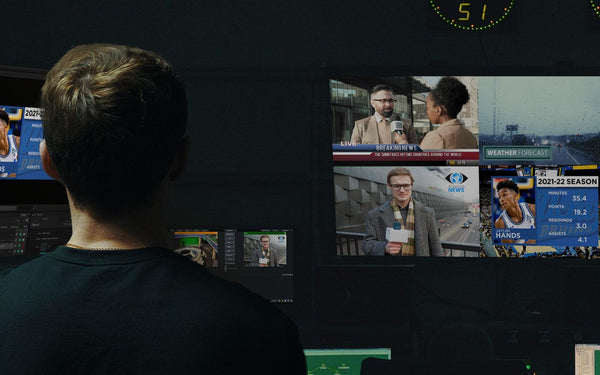 |
Deliver unlimited graphics Display unlimited layers of 3D animated graphics - per channel - on up to 16 channels of 4K-NDI® or 4K-SDI key/fill. Experience real-time playout and gain more control over your graphics with TriCaster® macro controls, automated graphic sequencing, data search tools, hotkey functions and more. |
|
Integrate with leading solutions Seamlessly work with leading NDI and SDI-based streaming solutions including Wirecast®, NewTek™, Broadcast Pix™, EVS®, Lumantek, vMix®, Blackmagic Design®, Roland®, Panasonic® and more. |
|
|
|
Leverage any design Import existing graphics from any design source, including Adobe® Photoshop® and After Effects® or customize ready-to-use designs in the Title Designer. Deliver 3D animated main titles, tables, lower thirds, crawls, bugs, scoreboards, statistics, social content and more. |
|
Control with a Stream Deck Connects directly with the Elgato Stream Deck and displays your title graphics directly on the keys for fast visual graphics control. |
 |
Streamline your workflows
Titler Live Broadcast introduces new workflows to help you get started quickly and easily make changes on the fly. Empowering you to design, set up, and playout your graphics in one complete broadcast solution.
- Design. Drag and drop included design templates onto your playlist or import your own designs from Adobe Photoshop and After Effects. Flexibly edit text, color, and images right in the Edit/Preview window.
- Connect. Easily connect data to your graphics to streamline your set up. Drag and drop data inputs or variables onto any part of a design to repurpose it as you need. Even connect multiple inputs to a design.
- Go live. Experience faster playout with an enhanced render engine. Quickly make animated updates to your live graphics on the fly. Deliver unlimited simultaneous graphics on up to 16 channels.
Plug in your data for real-time results
Seamlessly connect to your data to prepare dynamic graphics for any stream or broadcast. Use the new hotkey functionality to apply unique keyboard shortcuts to designs in your playlist and quickly take them live. Even control your graphics with the powerful API to customize your workflows and incorporate any of your data.
Bring in spreadsheets, XML, RSS and more
- Connect to Google Slides and Sheets, Excel spreadsheets and tables, XML files, RSS feeds, clocks, and more.
- Use the data search & select tool to quickly bring spreadsheet data into a design.
- Leverage spreadsheet autoplay mode to run-through your lower thirds, tables, and crawls.
Integrate with Social media
- Engage your audience with comments, tweets, and Facebook comment and reaction polling.
- Combine your Facebook, Twitter, and YouTube feeds into one to easily manage your show.
- Quickly queue your most relevant comments and posts into a custom social playlist.
Show scoreboards and statistics
- Bring in scoreboard data from DataLink, Stat Crew, or Sportzcast.
- Stat Crew statistics inputs support football, soccer, volleyball, basketball, and hockey.
Features and specifications
| Control | Outputs | Inputs | Design |
| Real-time playout Live animated updates per layer Automated sequencing & looping Spreadsheet and crawl autoplay mode Hotkey functionality Data search & select tool TriCaster macro control |
16 channels Unlimited graphics per channel Unlimited graphics per playlist 4K-NDI 4K-SDI key/fill (Blackmagic and AJA) PNG sequence support (NEW) HDMI OBS Watch Folder NewTek Airsend |
API support (NEW) |
3D animated graphics Animations, effects & transitions Native 4K resolution Adobe After Effects import Adobe Photoshop import Title Designer interface Sports & scoreboard packages Social media & polling packages Tables Lower thirds Crawls Main titles Motion bugs |
Compatibility and requirements
Inputs
- Any switcher with NDI inputs
- Any keying switcher with HDMI inputs
- Any switcher with SDI key/fill inputs (Blackmagic Design and AJA cards)
Software
- macOS 10.15 and later
- Windows 10
Hardware
- 2 GHz processor (multicore or multiprocessor CPU recommended for HD)
- 4 GB RAM (8 GB RAM or greater recommended for HD)
- 1.82 GB drive space for installation
GPU
- 2015 or later
- 1GB VRAM (2GB+ recommended)
- 902Mhz base clock (1506Mhz+ recommended)
Compare
Which Titler Live edition is right for you?
|
Titler Live Present |
Titler Live Sport | Titler Live Broadcast | |
|
Main Features |
Create and conduct presentations with ease. Enhance your live meetings with built-in data integrations and graphic designs. | Easily connect graphics to unique built-in scoreboard data controllers integrated with a variety of third-party scoring systems. | Leverage the power and versatility of our most popular on-air graphics and titling solution. |
| Simultaneous on-screen graphics | 3 | 3 | Unlimited |
| Output to NDI, SDI key/fill, HDMI | ✔ | ✔ | ✔ |
| Compatible with Wirecast, vMix, ATEM, OBS, Stream Deck | ✔ | ✔ | ✔ |
| Real-time playout interface with advanced controls | ✔ | ✔ | ✔ |
| Drive graphics from external data sources | ✔ | ✔ | ✔ |
| Built-in 3D-animated graphic design interface |
✔ | ✔ | ✔ |
| Design and play graphics without exporting | ✔ | ✔ | ✔ |
| Graphics library containing lower thirds, main titles, and motion bugs | ✔ | ✔ | ✔ |
| Instantly create and play multiple iterations of the same design via multi entry | ✔ | ✔ | ✔ |
| Direct import of media files (images, videos, sound, etc...) | ✔ | ✔ | ✔ |
| Live video inputs | ✔ | ✔ | ✔ |
| Over 500 built-in animations, effects, and transitions | ✔ | ✔ | ✔ |
| Excel and CSV spreadsheet integration | ✔ | ✔ | ✔ |
| Adobe Photoshop import | ✔ | ✔ | ✔ |
| Controllable countdown/up clocks | ✔ | ✔ | ✔ |
| Automated graphic scaling | ✔ | ✔ | ✔ |
| Rolling credits | ✔ | ✔ | ✔ |
| Google Sheets integration | ✔ | ✔ | ✔ |
| Google Slides integration | ✔ | ✔ | |
| Tickers and RSS feeds | ✔ | ✔ | |
| Display Facebook posts and Twitter tweets | ✔ | ✔ | |
| Facebook Live and YouTube Live chat and polling integration | ✔ | ✔ | |
| Corporate graphics templates | ✔ | ✔ | |
| Built-in graphics for soccer, basketball, football, volleyball, hockey, and lacrosse | ✔ | ✔ | |
| Manual scoreboard control interface | ✔ | ✔ | |
| Sportzcast, Stat Crew, and Daktronics scoreboard integration | ✔ | ✔ | |
| XML and JSON data inputs | ✔ | ✔ | |
| API endpoint for custom graphics controllers |
✔ | ||
| UHD 4K resolution | ✔ | ||
| Priority support and personalized training |
✔ | ||
| Adobe After Effects export | ✔ | ||
| TriCaster Macro Control | ✔ | ||
| Multi-page data graphic playout | ✔ | ||
| Downstream keying | ✔ | ||
| PTZ camera controls | ✔ | ||
| Spreadsheet keyboard shortcuts | ✔ | ||
| Output video as PNG sequence | ✔ | ||
| GameWisp, Stream Labels, Streamlabs, Titltify, and Twitch gaming inputs | ✔ |

Description
Top-of-the-line, high-value broadcast graphics
Experience the most powerful video overlay software yet with Captivate Broadcast, the most powerful video graphics solution yet with 16 channels of unlimited live graphics, ultimate data control, custom API integration & much more..
Elevate your broadcasts with cutting-edge graphics: streamline your workflows and deliver the next generation of on-air graphics with a more powerful, intuitive, and affordable graphics solution. Equipped for sports, new media, corporate events, and more.
Features
Electrify your broadcast with dynamic visuals
Titler Live Broadcast delivers unlimited layers of dynamic 3D animated graphics, including broadcast lower thirds, crawls, bugs, transitions, and score boards. Streamline your workflows and instantly elevate your production value with a more powerful, intuitive and affordable live broadcast graphics solution for sports, live media, corporate events, and more.
|
Deliver unlimited graphics Display unlimited layers of 3D animated graphics - per channel - on up to 16 channels of 4K-NDI® or 4K-SDI key/fill. Experience real-time playout and gain more control over your graphics with TriCaster® macro controls, automated graphic sequencing, data search tools, hotkey functions and more. |
|
Integrate with leading solutions Seamlessly work with leading NDI and SDI-based streaming solutions including Wirecast®, NewTek™, Broadcast Pix™, EVS®, Lumantek, vMix®, Blackmagic Design®, Roland®, Panasonic® and more. |
|
|
|
Leverage any design Import existing graphics from any design source, including Adobe® Photoshop® and After Effects® or customize ready-to-use designs in the Title Designer. Deliver 3D animated main titles, tables, lower thirds, crawls, bugs, scoreboards, statistics, social content and more. |
|
Control with a Stream Deck Connects directly with the Elgato Stream Deck and displays your title graphics directly on the keys for fast visual graphics control. |
|
Streamline your workflows
Titler Live Broadcast introduces new workflows to help you get started quickly and easily make changes on the fly. Empowering you to design, set up, and playout your graphics in one complete broadcast solution.
- Design. Drag and drop included design templates onto your playlist or import your own designs from Adobe Photoshop and After Effects. Flexibly edit text, color, and images right in the Edit/Preview window.
- Connect. Easily connect data to your graphics to streamline your set up. Drag and drop data inputs or variables onto any part of a design to repurpose it as you need. Even connect multiple inputs to a design.
- Go live. Experience faster playout with an enhanced render engine. Quickly make animated updates to your live graphics on the fly. Deliver unlimited simultaneous graphics on up to 16 channels.
Plug in your data for real-time results
Seamlessly connect to your data to prepare dynamic graphics for any stream or broadcast. Use the new hotkey functionality to apply unique keyboard shortcuts to designs in your playlist and quickly take them live. Even control your graphics with the powerful API to customize your workflows and incorporate any of your data.
Bring in spreadsheets, XML, RSS and more
- Connect to Google Slides and Sheets, Excel spreadsheets and tables, XML files, RSS feeds, clocks, and more.
- Use the data search & select tool to quickly bring spreadsheet data into a design.
- Leverage spreadsheet autoplay mode to run-through your lower thirds, tables, and crawls.
Integrate with Social media
- Engage your audience with comments, tweets, and Facebook comment and reaction polling.
- Combine your Facebook, Twitter, and YouTube feeds into one to easily manage your show.
- Quickly queue your most relevant comments and posts into a custom social playlist.
Show scoreboards and statistics
- Bring in scoreboard data from DataLink, Stat Crew, or Sportzcast.
- Stat Crew statistics inputs support football, soccer, volleyball, basketball, and hockey.
Features and specifications
| Control | Outputs | Inputs | Design |
| Real-time playout Live animated updates per layer Automated sequencing & looping Spreadsheet and crawl autoplay mode Hotkey functionality Data search & select tool TriCaster macro control |
16 channels Unlimited graphics per channel Unlimited graphics per playlist 4K-NDI 4K-SDI key/fill (Blackmagic and AJA) PNG sequence support (NEW) HDMI OBS Watch Folder NewTek Airsend |
API support (NEW) |
3D animated graphics Animations, effects & transitions Native 4K resolution Adobe After Effects import Adobe Photoshop import Title Designer interface Sports & scoreboard packages Social media & polling packages Tables Lower thirds Crawls Main titles Motion bugs |
Compatibility and requirements
Inputs
- Any switcher with NDI inputs
- Any keying switcher with HDMI inputs
- Any switcher with SDI key/fill inputs (Blackmagic Design and AJA cards)
Software
- macOS 10.15 and later
- Windows 10
Hardware
- 2 GHz processor (multicore or multiprocessor CPU recommended for HD)
- 4 GB RAM (8 GB RAM or greater recommended for HD)
- 1.82 GB drive space for installation
GPU
- 2015 or later
- 1GB VRAM (2GB+ recommended)
- 902Mhz base clock (1506Mhz+ recommended)
Compare
Which Titler Live edition is right for you?
|
Titler Live Present |
Titler Live Sport | Titler Live Broadcast | |
|
Main Features |
Create and conduct presentations with ease. Enhance your live meetings with built-in data integrations and graphic designs. | Easily connect graphics to unique built-in scoreboard data controllers integrated with a variety of third-party scoring systems. | Leverage the power and versatility of our most popular on-air graphics and titling solution. |
| Simultaneous on-screen graphics | 3 | 3 | Unlimited |
| Output to NDI, SDI key/fill, HDMI | ✔ | ✔ | ✔ |
| Compatible with Wirecast, vMix, ATEM, OBS, Stream Deck | ✔ | ✔ | ✔ |
| Real-time playout interface with advanced controls | ✔ | ✔ | ✔ |
| Drive graphics from external data sources | ✔ | ✔ | ✔ |
| Built-in 3D-animated graphic design interface |
✔ | ✔ | ✔ |
| Design and play graphics without exporting | ✔ | ✔ | ✔ |
| Graphics library containing lower thirds, main titles, and motion bugs | ✔ | ✔ | ✔ |
| Instantly create and play multiple iterations of the same design via multi entry | ✔ | ✔ | ✔ |
| Direct import of media files (images, videos, sound, etc...) | ✔ | ✔ | ✔ |
| Live video inputs | ✔ | ✔ | ✔ |
| Over 500 built-in animations, effects, and transitions | ✔ | ✔ | ✔ |
| Excel and CSV spreadsheet integration | ✔ | ✔ | ✔ |
| Adobe Photoshop import | ✔ | ✔ | ✔ |
| Controllable countdown/up clocks | ✔ | ✔ | ✔ |
| Automated graphic scaling | ✔ | ✔ | ✔ |
| Rolling credits | ✔ | ✔ | ✔ |
| Google Sheets integration | ✔ | ✔ | ✔ |
| Google Slides integration | ✔ | ✔ | |
| Tickers and RSS feeds | ✔ | ✔ | |
| Display Facebook posts and Twitter tweets | ✔ | ✔ | |
| Facebook Live and YouTube Live chat and polling integration | ✔ | ✔ | |
| Corporate graphics templates | ✔ | ✔ | |
| Built-in graphics for soccer, basketball, football, volleyball, hockey, and lacrosse | ✔ | ✔ | |
| Manual scoreboard control interface | ✔ | ✔ | |
| Sportzcast, Stat Crew, and Daktronics scoreboard integration | ✔ | ✔ | |
| XML and JSON data inputs | ✔ | ✔ | |
| API endpoint for custom graphics controllers |
✔ | ||
| UHD 4K resolution | ✔ | ||
| Priority support and personalized training |
✔ | ||
| Adobe After Effects export | ✔ | ||
| TriCaster Macro Control | ✔ | ||
| Multi-page data graphic playout | ✔ | ||
| Downstream keying | ✔ | ||
| PTZ camera controls | ✔ | ||
| Spreadsheet keyboard shortcuts | ✔ | ||
| Output video as PNG sequence | ✔ | ||
| GameWisp, Stream Labels, Streamlabs, Titltify, and Twitch gaming inputs | ✔ |