PTC Mathcad Prime - Subscription
OverviewPTC Mathcad Prime is the benchmark in engineering mathematics software, empowering users to solve, analyze, document, and share engineering calculations with ease. It offers a robust and user-friendly platform that ensures precise calculations, enhances traceability, safeguards intellectual property, and displays your work comprehensively. Craft your calculations in an engineering notebook that utilizes natural mathematical expressions and units intelligence. Illustrate your findings with a blend of rich formatting, plots, images, and text in a unified, professionally tailored document. Opt for PTC Mathcad Prime over traditional spreadsheets, which fall short in comparison. Mathcad presents mathematics in a visually intuitive manner, simplifying the process of defining, understanding, and adjusting engineering calculations through its whiteboard-like interface. |
|
Create, Manage, and Communicate Your Design Intent With One Tool
Maximize your efficiency and streamline your engineering calculations by utilizing PTC Mathcad. With its familiar math notation, you can create professional, image-rich documents and charts all within one program. PTC Mathcad is not just a software, it is where your design intent is brought to life.
|
|
|
|
|
Content Protection Control the degree of access and the visibility you want others to have with Area Protection and Locking. |
Solving Systems of Equations Quickly solve systems of linear, non-linear, and differential equations. |
Engineering Notebook Ensure the design intent of your CAD model is documented, protected and accessible for future efforts. |
|
|
|
|
|
Trig Equation Solver PTC Mathcad provides engineers with a powerful solution for calculating and visualizing trigonometry. |
Advanced Engineering Math PTC Mathcad includes powerful capabilities such as specialized and pre-built functions for engineers to solve advanced engineering math. |
Engineering Unit Converter Keep unit consistency throughout all engineering calculations. |
|
|
|
|
|
Advanced Numerics and Custom Functions New functions that are up to 100 times faster provide extended capability and return the result in easier to work with format. |
Comprehensive Documentation PTC Mathcad allows you to present calculations and designs by integrating live math, text, plots and images in one comprehensive document. |
Programming Write and integrate your own functions, customizing your environment to meet your specific requirements. |
|
|
|
|
|
3D Plots Many complex models require 3D views to better understand these models and data. Create 3D polar, contour and surface plots. |
Templates Create templates that include all your content and simply use that as the basis for your new worksheets. |
PTC Mathcad for the CAD Engineer PTC Mathcad allows CAD engineers to communicate engineering knowledge and design intent across the design lifecycle. |
Showcase your work with Mathcad's Excel integration
Get your work out of spreadsheets and inserted directly into Mathcad using an array of different Excel integrations. Present your calculations with plots, graphs, text, and images in a single document. That way everyone can truly see the work you’ve done.
 |
Engineering math in Excel This is what typical engineering math may look like in Excel. Your hopes of communicating engineering knowledge are easily lost in the chaos of cell references and parentheses. Spreadsheet math is error-prone, and it’s very difficult to check and validate your work. Excel also doesn’t have engineering units, so readers don’t even know what this formula is for. |
|
Engineering math in PTC Mathcad PTC Mathcad was designed to meet the needs of engineers. This is the same sample equation as what’s in Excel, but Mathcad’s natural math notation represents it like it’s right from a math textbook. Any engineer can look at and validate the formula. Plus, Mathcad keeps track of units, which lets you know that this is a formula for mechanical energy. |
 |
 |
Best of both worlds: Use Mathcad and Excel together If you’re convinced that you should use Mathcad for your engineering over Excel, that doesn’t mean you have to trash your Excel spreadsheets and convert them into Mathcad. You can use the two programs together and leverage their respective strengths—Excel’s data storage, and Mathcad’s calculations and documentation—because they are tightly integrated and interoperable. Mathcad can read Excel data and will automatically update if the spreadsheet changes. Mathcad can also write back into Excel spreadsheets.
|
What's New
 |
Usability and Productivity Updates
|
|
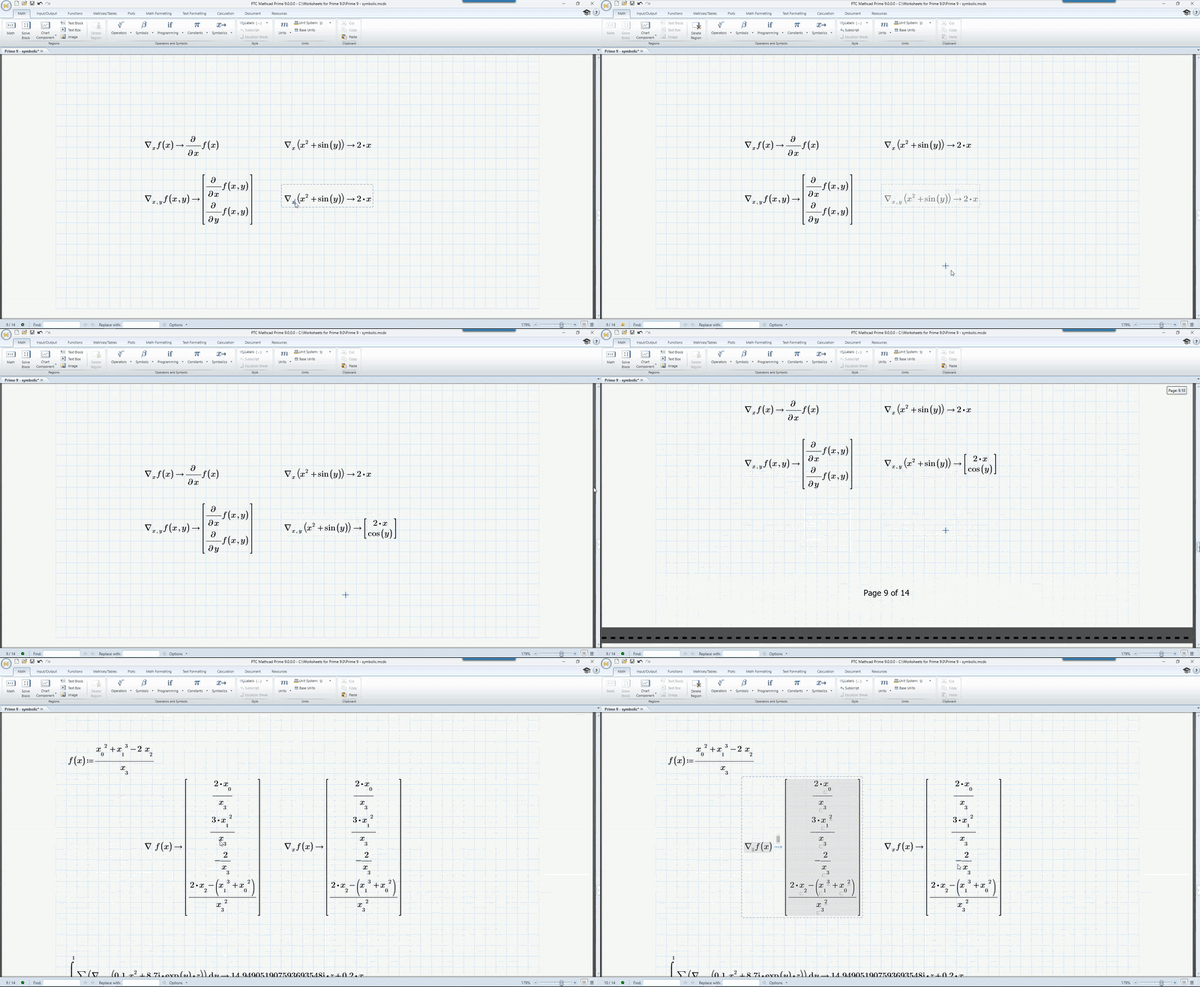
Symbolic and Numeric Engines Enhancements PTC continues to deliver on the power of the new symbolic engine, and valuable enhancements have also been made to the numeric engine to give users access to more mathematical operations and functionality than ever before.
|
 |
If you like Creo, you'll love Mathcad
Seamlessly perform calculations on your model designs by integrating Mathcad Prime directly into Creo Parametric.
You’ll be able to:
- Quickly modify calculations to drive the geometry of your design
- Easily connect and jump between Excel, calculations, 3D design, and simulation
- Instantly access calculations and documentation
Key Benefits
- Securely communicate design intent and engineering knowledge
- Intuitively construct calculations using standard math notation
- Author professional quality documents supported by live math, plots, text and images
- Repurpose standardized calculations to streamline next generation product development and avoid the need to recreate calculations
- Increase productivity with full units support throughout calculations
- Get instant access to comprehensive learning materials and tutorials from within the product to get productive faster
Features
Calculation
- Create calculations using standard operators for algebra, calculus, differential equations, logic, linear algebra, and more
- Evaluate, solve & manipulate expressions both numerically and symbolically
- Support for various data types including: scalar, vectors and matrices, complex numbers
- Create selectable lists of items to calculate using the combo box input control
Documentation and presentation
- Multi-document, task-oriented UI
- WYSIWYG document editing
- Document formatting and control
- Full control over text and math formatting
- Collapsible, lockable areas to prevent viewing or modification of proprietary information
Units management system
- Comprehensive unit support for numeric and symbolic calculations, functions, solve blocks, tables, vectors/matrices, and plots
- Automatic unit checking and conversion
- Leverage hundreds of predefined units
- Define custom units
Content protection
- Prevent accidental or intentional modification of specified calculations with password protection
- Lock content to prevent viewing and hide proprietary information
Functions
- Data Analysis
- Curve fitting and smoothing
- Probability and statistics
- Design of experiments
- Signal and image processing
- Differential equations
- Solving and optimization
- File I/O
- And hundreds more
Plotting and graphing
- X Y plots: scatter, line, column, bar, stem, waterfall, error, box, and effects
- 3-D plots
- Polar plots
- Contour plots
Solving
- Solvers for linear and nonlinear systems of algebraic and differential equations
- Optimize constrained systems using the robust and powerful KNITRO engine
- Display symbolic solutions to systems of equations
Data
- Integrate Microsoft Excel component to enable bidirectional data passing with PTC Mathcad worksheet content
- Connect to external data files using read and write functions for various file formats including: Text (.txt), Excel (.xlsx, .xls, .csv), Image (.bmp, .jpg)
- Write powerful integrations between PTC Mathcad and your favorite third-party applications using the Mathcad API
- Incorporate embedded content from external applications (OLE)
Engineering Notebook, Powered by PTC Mathcad
- Document design intent by embedding PTC Mathcad worksheets directly within a PTC Creo part or assembly
- Drive PTC Creo models from PTC Mathcad results
- Reference PTC Creo parameters as inputs to PTC Mathcad calculations
Programming
- Add logic using familiar programming operators and natural math notation
- Loops (for, while)
- Conditional statements (if, else if, else)
- Error catching (try/on error)
- Build recursive functions
Trial Download
Mathcad Free Trial Software Download
Download and test Mathcad before you make your purchasing decision.
Webinars
Latest PTC Mathcad Prime 5.0 Webinar from Novedge
HW Suggestions
Recommended System Specification
NOVEDGE is an authorized HP reseller that offers a wide range of professional quality notebooks and workstations to meet your hardware needs.
In addition, NOVEDGE works with High Speed Computing to customize workstations to give you the perfect hardware for your design needs at a competitive price. Contact us to discuss pre-built and custom configuration workstations and laptops.
You can find our selection of high performance hardware products at this LINK.
Below you can try our free experimental AI Service, which makes computer hardware recommendations for selected design software products. Our goal is to make it as good as a first line support human person, and it can work for you 24/7. Please give us your feedback to help make this service as good as it can be.
If you need help with sales instead, we have an excellent human team that will be happy to help you find the products best fit your needs from our very large selection of standard and custom workstations and laptops. You can get in touch with them by email at [email protected] or phone at 1-415-848-9018.
If you do not get a satisfactory answer try to rephrase the question in a more specific/detailed way
This service is a prototype and therefore it may return incorrect or incomplete answers. Furthermore, Artificial Intelligence is intrinsically prone to occasional mistakes, misunderstandings, and incomplete answers at least as much as human intelligence is.
This experimental service is offered as is and free of charge as a demonstration of the capabilities of Artificial Intelligence as an automated tool for support. Although the information found on this system has been produced and processed from sources believed to be reliable, no warranty, express or implied, is made regarding accuracy, adequacy, completeness, legality, reliability, or usefulness of any information.
Original: $818.00
-70%$818.00
$245.40
Description
OverviewPTC Mathcad Prime is the benchmark in engineering mathematics software, empowering users to solve, analyze, document, and share engineering calculations with ease. It offers a robust and user-friendly platform that ensures precise calculations, enhances traceability, safeguards intellectual property, and displays your work comprehensively. Craft your calculations in an engineering notebook that utilizes natural mathematical expressions and units intelligence. Illustrate your findings with a blend of rich formatting, plots, images, and text in a unified, professionally tailored document. Opt for PTC Mathcad Prime over traditional spreadsheets, which fall short in comparison. Mathcad presents mathematics in a visually intuitive manner, simplifying the process of defining, understanding, and adjusting engineering calculations through its whiteboard-like interface. |
|
Create, Manage, and Communicate Your Design Intent With One Tool
Maximize your efficiency and streamline your engineering calculations by utilizing PTC Mathcad. With its familiar math notation, you can create professional, image-rich documents and charts all within one program. PTC Mathcad is not just a software, it is where your design intent is brought to life.
|
|
|
|
|
Content Protection Control the degree of access and the visibility you want others to have with Area Protection and Locking. |
Solving Systems of Equations Quickly solve systems of linear, non-linear, and differential equations. |
Engineering Notebook Ensure the design intent of your CAD model is documented, protected and accessible for future efforts. |
|
|
|
|
|
Trig Equation Solver PTC Mathcad provides engineers with a powerful solution for calculating and visualizing trigonometry. |
Advanced Engineering Math PTC Mathcad includes powerful capabilities such as specialized and pre-built functions for engineers to solve advanced engineering math. |
Engineering Unit Converter Keep unit consistency throughout all engineering calculations. |
|
|
|
|
|
Advanced Numerics and Custom Functions New functions that are up to 100 times faster provide extended capability and return the result in easier to work with format. |
Comprehensive Documentation PTC Mathcad allows you to present calculations and designs by integrating live math, text, plots and images in one comprehensive document. |
Programming Write and integrate your own functions, customizing your environment to meet your specific requirements. |
|
|
|
|
|
3D Plots Many complex models require 3D views to better understand these models and data. Create 3D polar, contour and surface plots. |
Templates Create templates that include all your content and simply use that as the basis for your new worksheets. |
PTC Mathcad for the CAD Engineer PTC Mathcad allows CAD engineers to communicate engineering knowledge and design intent across the design lifecycle. |
Showcase your work with Mathcad's Excel integration
Get your work out of spreadsheets and inserted directly into Mathcad using an array of different Excel integrations. Present your calculations with plots, graphs, text, and images in a single document. That way everyone can truly see the work you’ve done.
|
Engineering math in Excel This is what typical engineering math may look like in Excel. Your hopes of communicating engineering knowledge are easily lost in the chaos of cell references and parentheses. Spreadsheet math is error-prone, and it’s very difficult to check and validate your work. Excel also doesn’t have engineering units, so readers don’t even know what this formula is for. |
|
Engineering math in PTC Mathcad PTC Mathcad was designed to meet the needs of engineers. This is the same sample equation as what’s in Excel, but Mathcad’s natural math notation represents it like it’s right from a math textbook. Any engineer can look at and validate the formula. Plus, Mathcad keeps track of units, which lets you know that this is a formula for mechanical energy. |
|
|
Best of both worlds: Use Mathcad and Excel together If you’re convinced that you should use Mathcad for your engineering over Excel, that doesn’t mean you have to trash your Excel spreadsheets and convert them into Mathcad. You can use the two programs together and leverage their respective strengths—Excel’s data storage, and Mathcad’s calculations and documentation—because they are tightly integrated and interoperable. Mathcad can read Excel data and will automatically update if the spreadsheet changes. Mathcad can also write back into Excel spreadsheets.
|
What's New
|
Usability and Productivity Updates
|
|
Symbolic and Numeric Engines Enhancements PTC continues to deliver on the power of the new symbolic engine, and valuable enhancements have also been made to the numeric engine to give users access to more mathematical operations and functionality than ever before.
|
|
If you like Creo, you'll love Mathcad
Seamlessly perform calculations on your model designs by integrating Mathcad Prime directly into Creo Parametric.
You’ll be able to:
- Quickly modify calculations to drive the geometry of your design
- Easily connect and jump between Excel, calculations, 3D design, and simulation
- Instantly access calculations and documentation
Key Benefits
- Securely communicate design intent and engineering knowledge
- Intuitively construct calculations using standard math notation
- Author professional quality documents supported by live math, plots, text and images
- Repurpose standardized calculations to streamline next generation product development and avoid the need to recreate calculations
- Increase productivity with full units support throughout calculations
- Get instant access to comprehensive learning materials and tutorials from within the product to get productive faster
Features
Calculation
- Create calculations using standard operators for algebra, calculus, differential equations, logic, linear algebra, and more
- Evaluate, solve & manipulate expressions both numerically and symbolically
- Support for various data types including: scalar, vectors and matrices, complex numbers
- Create selectable lists of items to calculate using the combo box input control
Documentation and presentation
- Multi-document, task-oriented UI
- WYSIWYG document editing
- Document formatting and control
- Full control over text and math formatting
- Collapsible, lockable areas to prevent viewing or modification of proprietary information
Units management system
- Comprehensive unit support for numeric and symbolic calculations, functions, solve blocks, tables, vectors/matrices, and plots
- Automatic unit checking and conversion
- Leverage hundreds of predefined units
- Define custom units
Content protection
- Prevent accidental or intentional modification of specified calculations with password protection
- Lock content to prevent viewing and hide proprietary information
Functions
- Data Analysis
- Curve fitting and smoothing
- Probability and statistics
- Design of experiments
- Signal and image processing
- Differential equations
- Solving and optimization
- File I/O
- And hundreds more
Plotting and graphing
- X Y plots: scatter, line, column, bar, stem, waterfall, error, box, and effects
- 3-D plots
- Polar plots
- Contour plots
Solving
- Solvers for linear and nonlinear systems of algebraic and differential equations
- Optimize constrained systems using the robust and powerful KNITRO engine
- Display symbolic solutions to systems of equations
Data
- Integrate Microsoft Excel component to enable bidirectional data passing with PTC Mathcad worksheet content
- Connect to external data files using read and write functions for various file formats including: Text (.txt), Excel (.xlsx, .xls, .csv), Image (.bmp, .jpg)
- Write powerful integrations between PTC Mathcad and your favorite third-party applications using the Mathcad API
- Incorporate embedded content from external applications (OLE)
Engineering Notebook, Powered by PTC Mathcad
- Document design intent by embedding PTC Mathcad worksheets directly within a PTC Creo part or assembly
- Drive PTC Creo models from PTC Mathcad results
- Reference PTC Creo parameters as inputs to PTC Mathcad calculations
Programming
- Add logic using familiar programming operators and natural math notation
- Loops (for, while)
- Conditional statements (if, else if, else)
- Error catching (try/on error)
- Build recursive functions
Trial Download
Mathcad Free Trial Software Download
Download and test Mathcad before you make your purchasing decision.
Webinars
Latest PTC Mathcad Prime 5.0 Webinar from Novedge
HW Suggestions
Recommended System Specification
NOVEDGE is an authorized HP reseller that offers a wide range of professional quality notebooks and workstations to meet your hardware needs.
In addition, NOVEDGE works with High Speed Computing to customize workstations to give you the perfect hardware for your design needs at a competitive price. Contact us to discuss pre-built and custom configuration workstations and laptops.
You can find our selection of high performance hardware products at this LINK.
Below you can try our free experimental AI Service, which makes computer hardware recommendations for selected design software products. Our goal is to make it as good as a first line support human person, and it can work for you 24/7. Please give us your feedback to help make this service as good as it can be.
If you need help with sales instead, we have an excellent human team that will be happy to help you find the products best fit your needs from our very large selection of standard and custom workstations and laptops. You can get in touch with them by email at [email protected] or phone at 1-415-848-9018.
If you do not get a satisfactory answer try to rephrase the question in a more specific/detailed way
This service is a prototype and therefore it may return incorrect or incomplete answers. Furthermore, Artificial Intelligence is intrinsically prone to occasional mistakes, misunderstandings, and incomplete answers at least as much as human intelligence is.
This experimental service is offered as is and free of charge as a demonstration of the capabilities of Artificial Intelligence as an automated tool for support. Although the information found on this system has been produced and processed from sources believed to be reliable, no warranty, express or implied, is made regarding accuracy, adequacy, completeness, legality, reliability, or usefulness of any information.