Publisher3D PDF
OverviewPublisher3D PDF is an easy-to-use, cost-effective way to share your 3D designs with anyone — no special software required. Simply import your 3D models and publish industry-standard 3D PDF files that open directly in the free Adobe Reader. Viewers can rotate, pan, zoom, and interact with the model instantly, without installing plug-ins or accessing the original CAD data. Designed for smooth communication and collaboration, Publisher3D PDF lets engineers, designers, and technical teams create interactive documents that are simple to distribute and even simpler to open. It’s the ideal solution for proposals, reviews, documentation, and customer communication — delivering rich 3D content in a familiar PDF format.
|
Features
Easy 3D PDF Creation with Publisher3D PDF
Publisher3D PDF is a software application for creating industry standard PDF files with embedded 3D models. 3D PDF files created with Publisher3D PDF can then be viewed in the standard, and freely available, Adobe Reader. No plug-ins to Reader are needed for rotating, panning and interactive with 3D objects in the resulting 3D PDF file.
 |
 |
 |
 |
|
Import 3D Import 3D files such as SolidWorks, Inventor, Rhino, SketchUp and more. |
Capture 3D Views Capture and record views for easy recall in the 3D PDF. |
Animate Setup transitions between views in the 3D PDF. |
Materials Library Apply materials from a library of hundreds of presets. |
 |
 |
 |
 |
|
Descriptive Text Display text on the page of your 3D PDF as 3D views are displayed. |
Move Parts Create and publish an animated explode view in 3D PDF. |
50+ Templates Choose a high-quality template designed for seamless PDF publishing. |
Rotate, Pan and Zoom Use the mouse to intuitively setup viewpoints of your 3D model. |
 |
 |
 |
 |
|
Preview View and interact with the document before publishing it to PDF. |
Custom Text and Images Simply click to set text and images that will be published to the PDF. |
Render Styles Setup the colors used when rendering the 3D view. |
Color Themes Modify the color scheme to match your preferences. |
Widespread 3D PDF Viewing with Adobe Reader
Publisher3D PDF is an easy to use software application for creating industry standard PDF files with embedded 3D models. 3D PDF files created with Share3D can then be viewed in the standard, and freely available, Adobe Reader. No plug-ins to Reader are needed for rotating, panning and interactive with 3D objects in the resulting 3D PDF file.
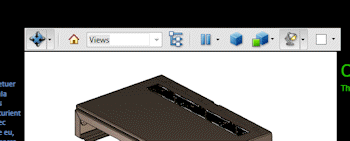 |
Interactive 3D Publisher3D PDF publishes PDF files that include embedded 3D content that can be rotated, panned and zoomed by anyone with Adobe Reader3D 9 or higher. |
|
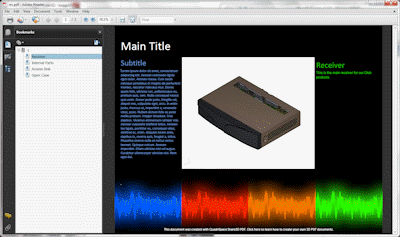
Page Design Publisher3D PDF includes more than 50 templates that seamlessly publish to PDF complete with interactive lists, tables and dynamic text display. |
 |

|
Bookmarks Publisher3D PDF allows users to capture named views of the 3D model. These are automatically added to the bookmarks panel of the Adobe Reader user interface, for easy animated recall. |
|
Model Tree Publisher3D PDF publishes the model tree for the 3D model to the PDF file. Inside Adobe Reader, users can click on parts by name to select them in the 3D view. |
 |
Supported 3D File Formats
Publisher3D PDF 2020 imports the following file formats:
- SolidWorks .sldasm
- SolidWorks .sldprt
- Inventor .prt
- Inventor .asm
- Google Sketchup .skp
- Autodesk DWF
- Rhino .3dm
- AutoCAD DWG
- AutoCAD DXF
- STEP
- IGES
- OBJ
- 3DS
- STL
- Solid Edge
- Creo
Trial Download
Publisher 3D PDF Trial Software Download
Test Publisher 3D PDF before you make your purchasing decision.

Description
OverviewPublisher3D PDF is an easy-to-use, cost-effective way to share your 3D designs with anyone — no special software required. Simply import your 3D models and publish industry-standard 3D PDF files that open directly in the free Adobe Reader. Viewers can rotate, pan, zoom, and interact with the model instantly, without installing plug-ins or accessing the original CAD data. Designed for smooth communication and collaboration, Publisher3D PDF lets engineers, designers, and technical teams create interactive documents that are simple to distribute and even simpler to open. It’s the ideal solution for proposals, reviews, documentation, and customer communication — delivering rich 3D content in a familiar PDF format.
|
Features
Easy 3D PDF Creation with Publisher3D PDF
Publisher3D PDF is a software application for creating industry standard PDF files with embedded 3D models. 3D PDF files created with Publisher3D PDF can then be viewed in the standard, and freely available, Adobe Reader. No plug-ins to Reader are needed for rotating, panning and interactive with 3D objects in the resulting 3D PDF file.
|
|
|
|
|
Import 3D Import 3D files such as SolidWorks, Inventor, Rhino, SketchUp and more. |
Capture 3D Views Capture and record views for easy recall in the 3D PDF. |
Animate Setup transitions between views in the 3D PDF. |
Materials Library Apply materials from a library of hundreds of presets. |
|
|
|
|
|
Descriptive Text Display text on the page of your 3D PDF as 3D views are displayed. |
Move Parts Create and publish an animated explode view in 3D PDF. |
50+ Templates Choose a high-quality template designed for seamless PDF publishing. |
Rotate, Pan and Zoom Use the mouse to intuitively setup viewpoints of your 3D model. |
|
|
|
|
|
Preview View and interact with the document before publishing it to PDF. |
Custom Text and Images Simply click to set text and images that will be published to the PDF. |
Render Styles Setup the colors used when rendering the 3D view. |
Color Themes Modify the color scheme to match your preferences. |
Widespread 3D PDF Viewing with Adobe Reader
Publisher3D PDF is an easy to use software application for creating industry standard PDF files with embedded 3D models. 3D PDF files created with Share3D can then be viewed in the standard, and freely available, Adobe Reader. No plug-ins to Reader are needed for rotating, panning and interactive with 3D objects in the resulting 3D PDF file.
|
Interactive 3D Publisher3D PDF publishes PDF files that include embedded 3D content that can be rotated, panned and zoomed by anyone with Adobe Reader3D 9 or higher. |
|
Page Design Publisher3D PDF includes more than 50 templates that seamlessly publish to PDF complete with interactive lists, tables and dynamic text display. |
|
|
|
Bookmarks Publisher3D PDF allows users to capture named views of the 3D model. These are automatically added to the bookmarks panel of the Adobe Reader user interface, for easy animated recall. |
|
Model Tree Publisher3D PDF publishes the model tree for the 3D model to the PDF file. Inside Adobe Reader, users can click on parts by name to select them in the 3D view. |
|
Supported 3D File Formats
Publisher3D PDF 2020 imports the following file formats:
- SolidWorks .sldasm
- SolidWorks .sldprt
- Inventor .prt
- Inventor .asm
- Google Sketchup .skp
- Autodesk DWF
- Rhino .3dm
- AutoCAD DWG
- AutoCAD DXF
- STEP
- IGES
- OBJ
- 3DS
- STL
- Solid Edge
- Creo
Trial Download
Publisher 3D PDF Trial Software Download
Test Publisher 3D PDF before you make your purchasing decision.