MoI 4
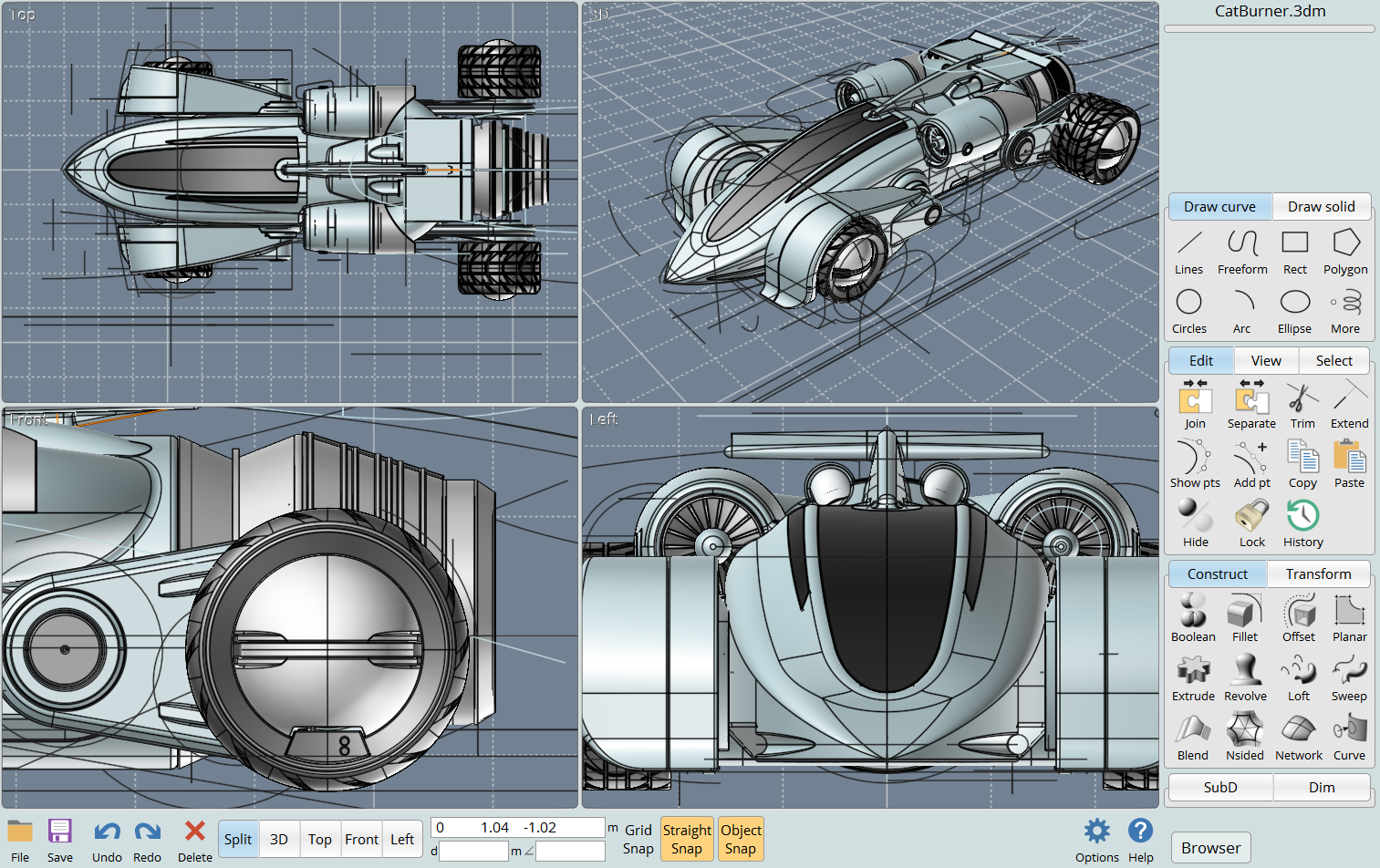
Powerful, accurate, yet easy to use! MoI's sleek intuitive UI blends a fluid easy workflow with powerful tools, making it the perfect choice for anyone who has been frustrated with the complexity of existing CAD tools.
MoI is also a fantastic complementary tool for a polygon-based artist since its CAD toolset and advanced boolean functions enable extremely rapid creation of mechanical or man-made type "hard surface" models. The icing on the cake is MoI's unique polygon mesh export that generates exceptionally clean and crisp N-Gon polygon meshes from CAD NURBS models.
New in This Version
The new release brings a lot of new features and improvements, including:
- 64-bit for improved performance on complex assets
- A native Mac build
- A new detailed object properties dialog
- A new annotation/dimension tools on the "Dim" tab in the side pane.
- Update FBX export - FBX version, object names, and materials
- Added SubD import option for open boundaries behavior under Options > Import/Export > SubD import options
- Update DXF/PDF/AI hidden line layer controls
- Update view tabs - enable right click to get reverse views
- Update file dialog filters
- Add moi.ini option for LWO export to not write styles as materials/surfaces in the LWO file
- Update STEP import/export - face colors
- Update Construct > Curve > Isect "Curve from 2 views"
- Update Trim - "stencil cut" options. Add options to Edit > Trim for deleting the cutting objects and for having a joined together result with "keep all" instead of always separating into pieces
- Update selection texture readback on Wine - test for Nvidia driver bug with red/blue bytes swapped and compensate
- Update command object model for properties undo
- Add script properties to Face objects
- And many bug fixes
Features
 |
Translator solution MoI excels as a file translator from CAD type formats into polygon formats. Attractive to artists using a polygon / DCC type tool that handles multi-sided polygons (n-gons - such as Cinema 4D), MoI 3 shines by allowing for example the file conversion from Rhino 3D into Cinema 4D, instead of the direct export from Rhino (which can only export triangles and quads, not n-gons). |
|
Learn CAD quickly and easily New users find learning MoI easy, and regular users love the how MoI works flawlessly, handling difficult blends and fillets with ease. |
 |
|
|
More choices for digital artists Digital artists who primarily work in a DCC type tool but need to occasionally build mechanical or industrial type parts where Booleans would work best choose MoI as a companion modeling tool. With it's small learning curve, artists can soon enjoy the freedom of using a toolset that works better for mechanical style shapes than poly tool sets. MoI thus also works well as a general industrial design tool, or for architects for non-standard building designs. |
|
Pen-tablet friendly user interface. MoI features a unique user interface that integrates particularly well with a pen tablet. Unlike most programs, you don't have to constantly tap the Shift, Alt, or Control keys, so you don't have to hover over the keyboard when using MoI. Also, as right-clicking tends to be awkward with a pen, MoI provides simple left-click methods for view manipulation functions that require right-clicking in other CAD programs. |
|
|
|
High quality display on inexpensive cards. MoI displays gorgeous anti-aliased curves even on low-end "gaming" video cards. |


HW Suggestions
Recommended System Specification
NOVEDGE is an authorized HP reseller that offers a wide range of professional quality notebooks and workstations to meet your hardware needs.
In addition, NOVEDGE works with High Speed Computing to customize workstations to give you the perfect hardware for your design needs at a competitive price. Contact us to discuss pre-built and custom configuration workstations and laptops.
You can find our selection of high performance hardware products at this LINK.
Below you can try our free experimental AI Service, which makes computer hardware recommendations for selected design software products. Our goal is to make it as good as a first line support human person, and it can work for you 24/7. Please give us your feedback to help make this service as good as it can be.
If you need help with sales instead, we have an excellent human team that will be happy to help you find the products best fit your needs from our very large selection of standard and custom workstations and laptops. You can get in touch with them by email at [email protected] or phone at 1-415-848-9018.
If you do not get a satisfactory answer try to rephrase the question in a more specific/detailed way
This service is a prototype and therefore it may return incorrect or incomplete answers. Furthermore, Artificial Intelligence is intrinsically prone to occasional mistakes, misunderstandings, and incomplete answers at least as much as human intelligence is.
This experimental service is offered as is and free of charge as a demonstration of the capabilities of Artificial Intelligence as an automated tool for support. Although the information found on this system has been produced and processed from sources believed to be reliable, no warranty, express or implied, is made regarding accuracy, adequacy, completeness, legality, reliability, or usefulness of any information.
Original: $279.00
-70%$279.00
$83.70
Description
Powerful, accurate, yet easy to use! MoI's sleek intuitive UI blends a fluid easy workflow with powerful tools, making it the perfect choice for anyone who has been frustrated with the complexity of existing CAD tools.
MoI is also a fantastic complementary tool for a polygon-based artist since its CAD toolset and advanced boolean functions enable extremely rapid creation of mechanical or man-made type "hard surface" models. The icing on the cake is MoI's unique polygon mesh export that generates exceptionally clean and crisp N-Gon polygon meshes from CAD NURBS models.
New in This Version
The new release brings a lot of new features and improvements, including:
- 64-bit for improved performance on complex assets
- A native Mac build
- A new detailed object properties dialog
- A new annotation/dimension tools on the "Dim" tab in the side pane.
- Update FBX export - FBX version, object names, and materials
- Added SubD import option for open boundaries behavior under Options > Import/Export > SubD import options
- Update DXF/PDF/AI hidden line layer controls
- Update view tabs - enable right click to get reverse views
- Update file dialog filters
- Add moi.ini option for LWO export to not write styles as materials/surfaces in the LWO file
- Update STEP import/export - face colors
- Update Construct > Curve > Isect "Curve from 2 views"
- Update Trim - "stencil cut" options. Add options to Edit > Trim for deleting the cutting objects and for having a joined together result with "keep all" instead of always separating into pieces
- Update selection texture readback on Wine - test for Nvidia driver bug with red/blue bytes swapped and compensate
- Update command object model for properties undo
- Add script properties to Face objects
- And many bug fixes
Features
|
Translator solution MoI excels as a file translator from CAD type formats into polygon formats. Attractive to artists using a polygon / DCC type tool that handles multi-sided polygons (n-gons - such as Cinema 4D), MoI 3 shines by allowing for example the file conversion from Rhino 3D into Cinema 4D, instead of the direct export from Rhino (which can only export triangles and quads, not n-gons). |
|
Learn CAD quickly and easily New users find learning MoI easy, and regular users love the how MoI works flawlessly, handling difficult blends and fillets with ease. |
|
|
|
More choices for digital artists Digital artists who primarily work in a DCC type tool but need to occasionally build mechanical or industrial type parts where Booleans would work best choose MoI as a companion modeling tool. With it's small learning curve, artists can soon enjoy the freedom of using a toolset that works better for mechanical style shapes than poly tool sets. MoI thus also works well as a general industrial design tool, or for architects for non-standard building designs. |
|
Pen-tablet friendly user interface. MoI features a unique user interface that integrates particularly well with a pen tablet. Unlike most programs, you don't have to constantly tap the Shift, Alt, or Control keys, so you don't have to hover over the keyboard when using MoI. Also, as right-clicking tends to be awkward with a pen, MoI provides simple left-click methods for view manipulation functions that require right-clicking in other CAD programs. |
|
|
|
High quality display on inexpensive cards. MoI displays gorgeous anti-aliased curves even on low-end "gaming" video cards. |
HW Suggestions
Recommended System Specification
NOVEDGE is an authorized HP reseller that offers a wide range of professional quality notebooks and workstations to meet your hardware needs.
In addition, NOVEDGE works with High Speed Computing to customize workstations to give you the perfect hardware for your design needs at a competitive price. Contact us to discuss pre-built and custom configuration workstations and laptops.
You can find our selection of high performance hardware products at this LINK.
Below you can try our free experimental AI Service, which makes computer hardware recommendations for selected design software products. Our goal is to make it as good as a first line support human person, and it can work for you 24/7. Please give us your feedback to help make this service as good as it can be.
If you need help with sales instead, we have an excellent human team that will be happy to help you find the products best fit your needs from our very large selection of standard and custom workstations and laptops. You can get in touch with them by email at [email protected] or phone at 1-415-848-9018.
If you do not get a satisfactory answer try to rephrase the question in a more specific/detailed way
This service is a prototype and therefore it may return incorrect or incomplete answers. Furthermore, Artificial Intelligence is intrinsically prone to occasional mistakes, misunderstandings, and incomplete answers at least as much as human intelligence is.
This experimental service is offered as is and free of charge as a demonstration of the capabilities of Artificial Intelligence as an automated tool for support. Although the information found on this system has been produced and processed from sources believed to be reliable, no warranty, express or implied, is made regarding accuracy, adequacy, completeness, legality, reliability, or usefulness of any information.