✨ New Arrivals Just Dropped!Explore
HomeStore

Infinite Horizon

Infinite Horizon


Overview


Infinite Horizon
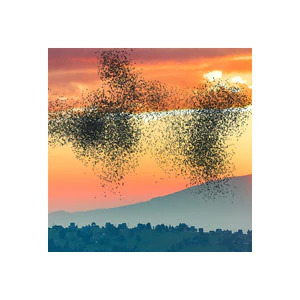
enables users to create mind-blowing, perspective-bending scenes from their footage or photos in Adobe After Effects. Simply drop in your landscape or waterscape footage, mark where the horizon is, and then open one of the 14 presets to see your footage manipulated, bent, or curved in different ways. Everything is customizable, allowing you to create a variety of surreal, other-worldly perspectives.

Customize the bend, shadows, highlights, and background with easy-to-use controls. The 3D comps convert your bent landscapes into 3D scenes, allowing you to animate a camera through and around your landscape in three dimensions.


Create perspective-bending 3D scenes in After Effects!


Features


  • Compatible with Both HD and 4K Footage

  • Works with Photos - Add movement to your landscape using the customization contols. Animate the camera in three dimensions to create a 3D animation with a parallax effect - all from a single still photo.

  • 14 Presets - Each preset bends or curves your footage in a different way. You can customize the bend, add new bends, or combine multiple presets to create a variety of unique perspectives.


  • Easy Customization - Customize the scenes with easy slider controls. Detailed instructions are found throughout the template.

  • 3D Options - Each preset offers some kind of 3D capability. Most presets use a technique called "Projection Mapping", allowing you to animate your camera in three dimensions around your scene. Since it uses 3D layers, you can adjust the depth of field blurring for a greater sense of 3D depth.

  • Shadows, Highlights, and Background - These optional elements can add realism and depth to your scene.


  • Layer Bender - The Layer Bender allows you to bend or curve 2D layers in three dimensions. This is not normally possible in After Effects. Add custom curves to footage, photos, precomps, and solid layers. This tool could be useful to motion designers for many projects to come.

  • Kaleidoscope - Create complex symmetrical patterns from your footage. The patterns use depth of field and warping to simulate a 3D look when the camera is animated


Need to Know

  • This template is compatible with Adobe After Effects, version 16.0 (CC 2019) and all later versions. Works on both PCs and Macs. No plugins required.
  • This template includes separate project files in HD (1920x1080) and 4K (4096x2048). Other resolutions can be attained by changing the resolution of comps, corresponding precomps, and solid layers.
  • These effects work best with landscape, waterscape, and cityscape footage or photos. For some presets, high-elevation aerial footage looks best. For others, a top-view or 45° camera angle works best. Different presets may have unique requirements.
  • Some of the presets use 2D effects to achieve a subtle 3D look. 3D rotation is quite limited in these presets. Other presets use "Projection Mapping", allowing you to animate the camera in 3D, through your scene.
  • This template has been "universalized", so it will work in After Effects running in any language.


Tutorials


$56.05
Infinite Horizon
$56.05
Product image 1

Description


Overview


Infinite Horizon
enables users to create mind-blowing, perspective-bending scenes from their footage or photos in Adobe After Effects. Simply drop in your landscape or waterscape footage, mark where the horizon is, and then open one of the 14 presets to see your footage manipulated, bent, or curved in different ways. Everything is customizable, allowing you to create a variety of surreal, other-worldly perspectives.

Customize the bend, shadows, highlights, and background with easy-to-use controls. The 3D comps convert your bent landscapes into 3D scenes, allowing you to animate a camera through and around your landscape in three dimensions.


Create perspective-bending 3D scenes in After Effects!


Features


  • Compatible with Both HD and 4K Footage

  • Works with Photos - Add movement to your landscape using the customization contols. Animate the camera in three dimensions to create a 3D animation with a parallax effect - all from a single still photo.

  • 14 Presets - Each preset bends or curves your footage in a different way. You can customize the bend, add new bends, or combine multiple presets to create a variety of unique perspectives.


  • Easy Customization - Customize the scenes with easy slider controls. Detailed instructions are found throughout the template.

  • 3D Options - Each preset offers some kind of 3D capability. Most presets use a technique called "Projection Mapping", allowing you to animate your camera in three dimensions around your scene. Since it uses 3D layers, you can adjust the depth of field blurring for a greater sense of 3D depth.

  • Shadows, Highlights, and Background - These optional elements can add realism and depth to your scene.


  • Layer Bender - The Layer Bender allows you to bend or curve 2D layers in three dimensions. This is not normally possible in After Effects. Add custom curves to footage, photos, precomps, and solid layers. This tool could be useful to motion designers for many projects to come.

  • Kaleidoscope - Create complex symmetrical patterns from your footage. The patterns use depth of field and warping to simulate a 3D look when the camera is animated


Need to Know

  • This template is compatible with Adobe After Effects, version 16.0 (CC 2019) and all later versions. Works on both PCs and Macs. No plugins required.
  • This template includes separate project files in HD (1920x1080) and 4K (4096x2048). Other resolutions can be attained by changing the resolution of comps, corresponding precomps, and solid layers.
  • These effects work best with landscape, waterscape, and cityscape footage or photos. For some presets, high-elevation aerial footage looks best. For others, a top-view or 45° camera angle works best. Different presets may have unique requirements.
  • Some of the presets use 2D effects to achieve a subtle 3D look. 3D rotation is quite limited in these presets. Other presets use "Projection Mapping", allowing you to animate the camera in 3D, through your scene.
  • This template has been "universalized", so it will work in After Effects running in any language.


Tutorials


Infinite Horizon | NOVEDGE