✨ New Arrivals Just Dropped!Explore
HomeStore

Landscaper

Landscaper


Overview


Landscaper
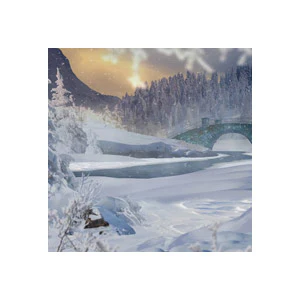
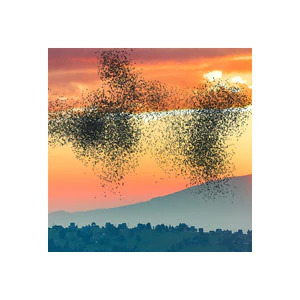
allows you to create stunning 3D landscapes in Adobe After Effects. With a library of 1,000 landscape elements, you can create virtually any kind of landscape – from winter wonderlands to tropical beaches, and arid deserts to epic fantasy worlds! Animate your camera to bring the 3D scene to life, and enhance your scene with custom effects like waterfalls, fog, rainbows, haze, 3D titles, and more. Also included are 30 finished landscapes. Easily customize them, or drop a 3D title into the scene, and they're ready to render.

The framework is all set up so that you, the landscaper, can focus on creativity. Simply draw a mask to create a lake. Just turn the clock to set the lighting and time of day. Or... keyframe the clock and create a time lapse. Designed for ease of use and total customization, Landscaper is an all-in-one package that turns imagination to animation, with striking results!

Create perspective-bending 3D scenes in After Effects!


Features

  • Element Library - 1,000 high-resolution images of various landscape elements, ranging from individual flowers to large mountains. Elements have transparent backgrounds and built-in lighting effects, and are ready to copy-and-paste into your landscape. The images are easily searchable by category, by keyword, or by similarity. Search directly in After Effects, or browse the Element Library online.

  • Finished Landscapes - Landscaper includes 30 finished landscapes covering a variety of environments, and using a variety of effects. These are the landscapes from the demo video above. They're great for learning new techniques, or, just render them out with your own title and use them in your project.

  • Effects Library - 24 custom effects that you can copy and paste to your landscape, including a variety of weather effects, clouds, atmospheric haze, floating pollen, shooting stars, rainbows, 3D titles, and "3D warp" - a way to make 2D elements look 3D.
  • Total Customization - Everything is customizable using convenient slider controls, with the exception of several pre-rendered elements (see list of effects below). A Control Layer at the top of every landscape comp allows you to easily customize the fundamental features of every landscape - the ground, water, sky, atmospheric haze, sun, moon, and lighting.

  • Realistic 3D Ground - Your landscape uses Camera Projection Mapping to get the most realistic 3D ground that can be achieved in After Effects. Everything is set up, so all you need to do is choose one of the 68 included ground images (or add your own).

  • Easy Water - It couldn't be any easier to add 3D puddles, rivers, lakes, or oceans. Simply draw a mask with the Pen tool on your ground layer in the shape of your body of water. Your water will appear, and your background elements will be realistically reflected in the water. Customize the reflections and ripples with slider controls. Add the included "Beach" effect to create custom beach scenes.


  • Auto-Sky - The Auto-Sky feature allows you to change the lighting and mood of the scene with a single "Clock" control. Set the clock to midnight to darken your scene and bring out the stars. Set it to 7pm to see warm colors and a sunset. All of the colors can be adjusted with easy controls.

  • Time Lapses - With Auto-Sky activated, simply keyframe the clock control to animate a time lapse. The effects in your scene will automatically speed up, including the water ripples, elements blowing in the wind, and the clouds.

  • HD or 4K - HD (1920x1080) and 4K (4096x2160) comps are included for all landscapes. Change the comps to any resolution by following the instructions in the tutorial.


How It Works


Landscaper is built entirely in After Effects and is designed for easy customization using slider controls. Landscapes are composed of 2D images, called "elements", arranged in 3D space. 3D modelers/animators would probably refer to this as 2D animation, but After Effects users would refer to this as a 3D scene. Technically, it's 2.5D.

As you start your new landscape, it will have several default features - a ground plane, optional water, a sky, stars, sun and moon. After choosing your image for the ground and sky, you can start filling your landscape with elements and positioning them in 3D space. Lighting effects and atmospheric haze are built in to the elements, so their brightness and colors are affected by their distance from the camera, and by whatever time of day you set the clock to. Once you have built up your scene, add some finishing touches from the Effects folder, such as 3D titles, fog, wind, heat haze, insects, birds, falling leaves, auroras, and floating pollen. Add subtle camera movements to create parallax and show off your 3D creation.


Need to Know

  • This template is compatible with Adobe After Effects, version 18.0 (CC 2021) and all later versions. Works on both PCs and Macs. No plugins required.
  • This template includes both HD (1920x1080) and 4K (4096x2160) versions of each landscape. You can change the comps to any resolution by following the instructions in the video tutorial.
  • The 3D ground planes are made with a technique called "camera projection mapping". If you decide to use the ground plane, you are limited in how far you can move the camera, before the image starts to look distorted. Longer, more complex camera movements are possible, but you would need to hide the ground plane.
  • All landscapes and effects in the demo video above are included in the template.
  • All images in this template are public domain or a similar license. Most landscape elements were taken from Pixabay.com and are released under the Pixabay License, which allows for both non-commercial and commercial use, no attribution required. A few images were taken from Flicker Creative Commons or Wikimedia Commons, and are labeled as public domain. The original photos have been color-corrected and altered to create a transparent background.
  • The file size is very large - about 1.5 GB. Please allow plenty of time for downloading. If you have any problems downloading, send me a message.
  • This template has been "universalized", so it will work in After Effects running in any language.
 

$94.05
Landscaper
$94.05
Product image 1

Description


Overview


Landscaper
allows you to create stunning 3D landscapes in Adobe After Effects. With a library of 1,000 landscape elements, you can create virtually any kind of landscape – from winter wonderlands to tropical beaches, and arid deserts to epic fantasy worlds! Animate your camera to bring the 3D scene to life, and enhance your scene with custom effects like waterfalls, fog, rainbows, haze, 3D titles, and more. Also included are 30 finished landscapes. Easily customize them, or drop a 3D title into the scene, and they're ready to render.

The framework is all set up so that you, the landscaper, can focus on creativity. Simply draw a mask to create a lake. Just turn the clock to set the lighting and time of day. Or... keyframe the clock and create a time lapse. Designed for ease of use and total customization, Landscaper is an all-in-one package that turns imagination to animation, with striking results!

Create perspective-bending 3D scenes in After Effects!


Features

  • Element Library - 1,000 high-resolution images of various landscape elements, ranging from individual flowers to large mountains. Elements have transparent backgrounds and built-in lighting effects, and are ready to copy-and-paste into your landscape. The images are easily searchable by category, by keyword, or by similarity. Search directly in After Effects, or browse the Element Library online.

  • Finished Landscapes - Landscaper includes 30 finished landscapes covering a variety of environments, and using a variety of effects. These are the landscapes from the demo video above. They're great for learning new techniques, or, just render them out with your own title and use them in your project.

  • Effects Library - 24 custom effects that you can copy and paste to your landscape, including a variety of weather effects, clouds, atmospheric haze, floating pollen, shooting stars, rainbows, 3D titles, and "3D warp" - a way to make 2D elements look 3D.
  • Total Customization - Everything is customizable using convenient slider controls, with the exception of several pre-rendered elements (see list of effects below). A Control Layer at the top of every landscape comp allows you to easily customize the fundamental features of every landscape - the ground, water, sky, atmospheric haze, sun, moon, and lighting.

  • Realistic 3D Ground - Your landscape uses Camera Projection Mapping to get the most realistic 3D ground that can be achieved in After Effects. Everything is set up, so all you need to do is choose one of the 68 included ground images (or add your own).

  • Easy Water - It couldn't be any easier to add 3D puddles, rivers, lakes, or oceans. Simply draw a mask with the Pen tool on your ground layer in the shape of your body of water. Your water will appear, and your background elements will be realistically reflected in the water. Customize the reflections and ripples with slider controls. Add the included "Beach" effect to create custom beach scenes.


  • Auto-Sky - The Auto-Sky feature allows you to change the lighting and mood of the scene with a single "Clock" control. Set the clock to midnight to darken your scene and bring out the stars. Set it to 7pm to see warm colors and a sunset. All of the colors can be adjusted with easy controls.

  • Time Lapses - With Auto-Sky activated, simply keyframe the clock control to animate a time lapse. The effects in your scene will automatically speed up, including the water ripples, elements blowing in the wind, and the clouds.

  • HD or 4K - HD (1920x1080) and 4K (4096x2160) comps are included for all landscapes. Change the comps to any resolution by following the instructions in the tutorial.


How It Works


Landscaper is built entirely in After Effects and is designed for easy customization using slider controls. Landscapes are composed of 2D images, called "elements", arranged in 3D space. 3D modelers/animators would probably refer to this as 2D animation, but After Effects users would refer to this as a 3D scene. Technically, it's 2.5D.

As you start your new landscape, it will have several default features - a ground plane, optional water, a sky, stars, sun and moon. After choosing your image for the ground and sky, you can start filling your landscape with elements and positioning them in 3D space. Lighting effects and atmospheric haze are built in to the elements, so their brightness and colors are affected by their distance from the camera, and by whatever time of day you set the clock to. Once you have built up your scene, add some finishing touches from the Effects folder, such as 3D titles, fog, wind, heat haze, insects, birds, falling leaves, auroras, and floating pollen. Add subtle camera movements to create parallax and show off your 3D creation.


Need to Know

  • This template is compatible with Adobe After Effects, version 18.0 (CC 2021) and all later versions. Works on both PCs and Macs. No plugins required.
  • This template includes both HD (1920x1080) and 4K (4096x2160) versions of each landscape. You can change the comps to any resolution by following the instructions in the video tutorial.
  • The 3D ground planes are made with a technique called "camera projection mapping". If you decide to use the ground plane, you are limited in how far you can move the camera, before the image starts to look distorted. Longer, more complex camera movements are possible, but you would need to hide the ground plane.
  • All landscapes and effects in the demo video above are included in the template.
  • All images in this template are public domain or a similar license. Most landscape elements were taken from Pixabay.com and are released under the Pixabay License, which allows for both non-commercial and commercial use, no attribution required. A few images were taken from Flicker Creative Commons or Wikimedia Commons, and are labeled as public domain. The original photos have been color-corrected and altered to create a transparent background.
  • The file size is very large - about 1.5 GB. Please allow plenty of time for downloading. If you have any problems downloading, send me a message.
  • This template has been "universalized", so it will work in After Effects running in any language.